# OptionData — full documentation for AI agents
> Public Markdown of the OptionData API reference. Prefer https://www.optiondata.io/llms.txt for a short map. No sign-in required.
## Key facts
- Brand: OptionData — website https://www.optiondata.io/ (not the Google Sheets OPTIONDATA formula or unrelated "option data" tools).
- License: OPRA-licensed U.S. equity options feed.
- Realtime: WebSocket at wss://ws.optiondata.io with token auth.
- HTTP auth: prefer Authorization: Bearer apikey_… (Market Structure requires it; Historical SQL and Option Chain also accept body api_key for compatibility).
- History: ClickHouse SQL via POST https://www.optiondata.io/api/historical/sql (authenticated; minimum 15-minute trade-data delay; trade history from 2025-02-18).
- Option chain: POST https://www.optiondata.io/api/option-chain (authenticated; sessions from 2026-02-20+).
- Market structure: GET https://www.optiondata.io/api/v1/market-structure/{symbol} (Bearer; optional date=YYYY-MM-DD).
- Pricing: Pro list price $599/month for the API products; first-year promotional pricing may apply with a coupon; 14-day free trial.
- Support: support@optiondata.io · Discord https://discord.com/invite/mE5pEDMdWs
- Social: https://x.com/optiondataio
- Auth for agents: this file, /llm.txt, /llms-full.txt, /openapi.json, and /md/{slug} are public. Product playgrounds and account pages require sign-in.
## Core product pages
- [Home](https://www.optiondata.io/)
- [Docs index](https://www.optiondata.io/docs/)
- [OpenAPI](https://www.optiondata.io/openapi.json)
- [Real-time options data](https://www.optiondata.io/realtime_data/)
- [Historical options SQL](https://www.optiondata.io/historical_data/)
- [Option chain](https://www.optiondata.io/option_chain/)
- [Market structure](https://www.optiondata.io/market_structure/)
- [Blog](https://www.optiondata.io/blog/)
- [Changelog](https://www.optiondata.io/changelog/)
- [Support](https://www.optiondata.io/support/)
## Getting Started with OptionData
- HTML: https://www.optiondata.io/docs/getting-started/
- Markdown: https://www.optiondata.io/md/getting-started/
This guide takes you from a new account to your first authenticated OptionData request.
## 1. Create or sign in to your account
Open [OptionData](https://www.optiondata.io/) and sign in with your email address. OptionData sends a one-time verification code to complete authentication.
## 2. Complete the qualification survey
The data products are gated by a short qualification survey. Enter the invitation code supplied to you and complete the licensing attestations.
After the survey is accepted, OptionData creates your Stripe customer record and starts the **14-day Pro trial**. No payment method is required to begin the trial.
## 3. Copy your API key
Open [API Key](/api_key), then select **Copy**. Store the key in a password manager or environment variable—never commit it to source control.
For detailed key handling and rotation, see [Manage Your API Key](/docs/manage-api-key).
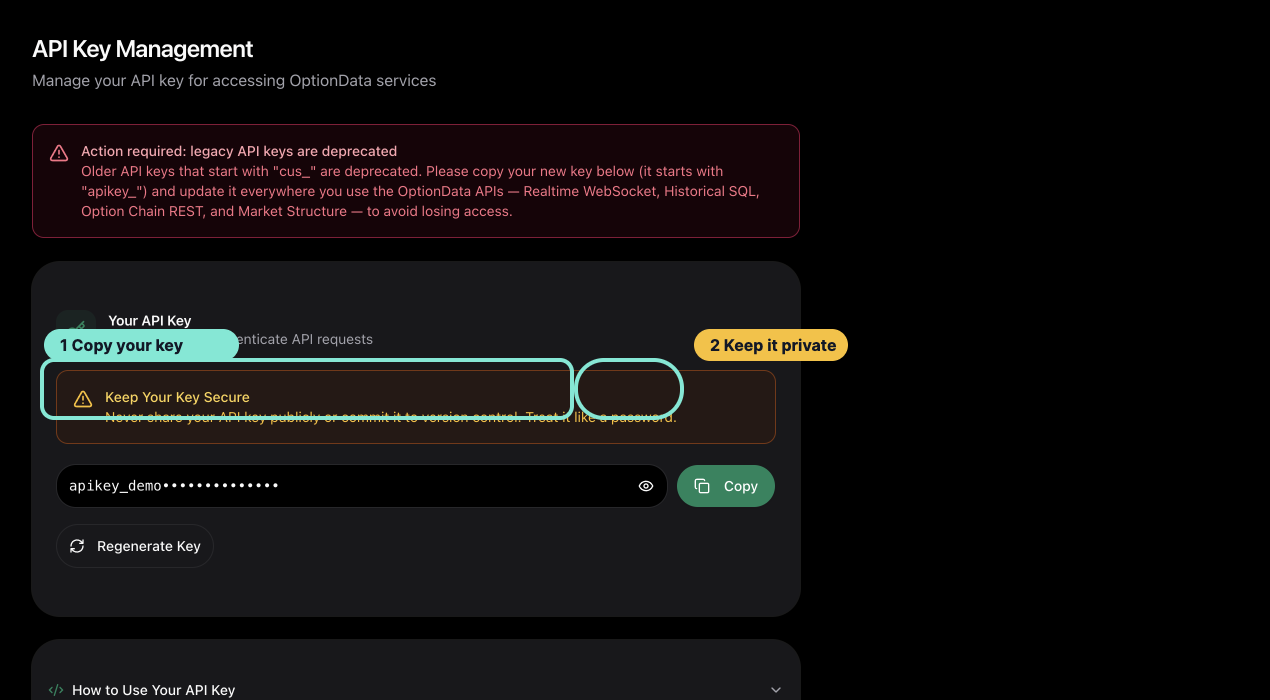
*The API Key page is the handoff point between account setup and your first API request.*
## 4. Choose your first workflow
| Goal | Start here |
|---|---|
| Validate a WebSocket client | [Realtime WebSocket Quickstart](/docs/realtime-websocket-quickstart) |
| Query historical option trades | [Historical SQL Quickstart](/docs/historical-sql-quickstart) |
| Retrieve a current option chain | [Option Chain Quickstart](/docs/option-chain-quickstart) |
| Read GEX, walls, and volatility context | [Market Structure Quickstart](/docs/market-structure-quickstart) |
The same API key authenticates all four workflows. Access requires an active or trialing Pro subscription.
## 5. Continue after the trial
During a no-card trial, the dashboard shows how many days remain. To continue access after the trial, follow [Add a Payment Method During Your Free Trial](/docs/add-payment-method).
Review your plan, trial end date, and billing state at [Billing](/billing).
## What trial access includes
- Realtime WebSocket access during the trial.
- Historical SQL with responses capped at 10 rows.
- Option Chain and Market Structure access.
- The same authentication and response contracts used by active subscriptions.
If a request fails, use [Troubleshoot Authentication and Access](/docs/troubleshoot-api-access) before rotating your key.
## Manage Your API Key
- HTML: https://www.optiondata.io/docs/manage-api-key/
- Markdown: https://www.optiondata.io/md/manage-api-key/
Your OptionData API key authenticates Realtime WebSocket, Historical SQL, Option Chain, and Market Structure requests.
## View and copy the key
1. Sign in and open [API Key](/api_key).
2. Select the eye control only when you need to inspect the full key.
3. Select **Copy** to copy the current value.
The portal normally issues an `apikey_...` token. Treat it like a password.
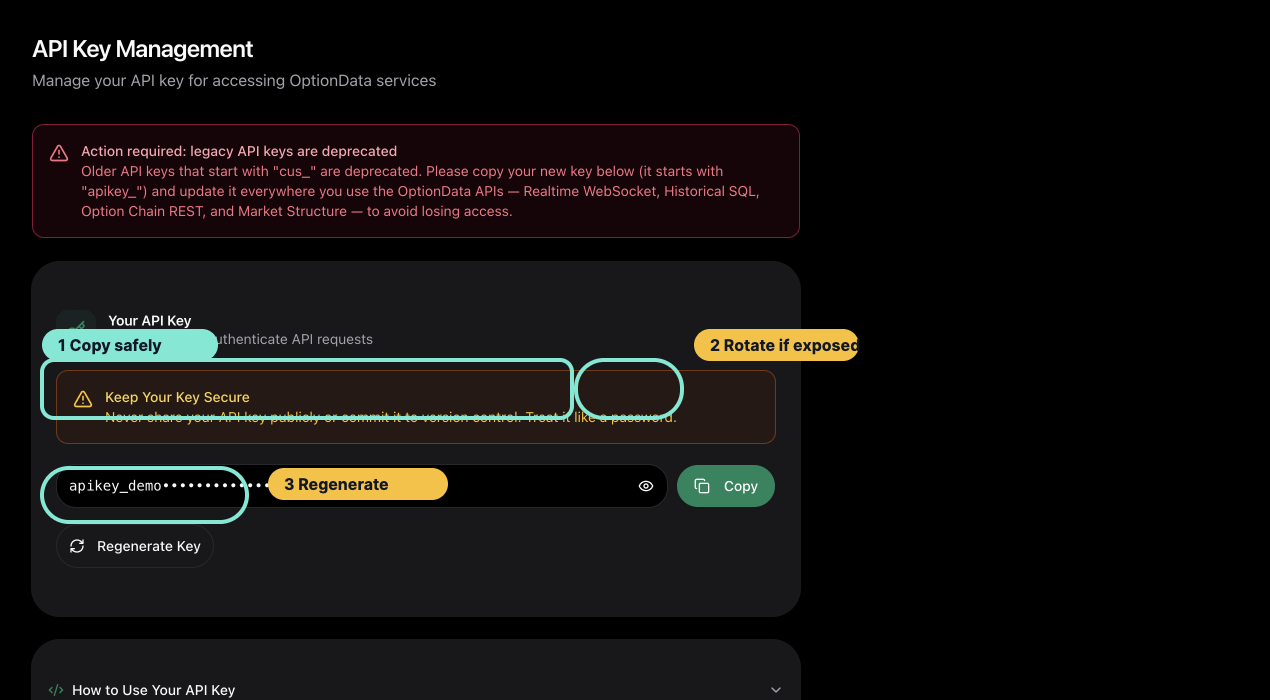
*Copy the masked portal key when you need to configure a client; regenerate only when you are ready to update every consumer.*
## Store it safely
Keep the key in a secret manager or local environment variable:
```bash
export OPTIONDATA_API_KEY="YOUR_API_KEY"
```
Do not place a real key in:
- Git-tracked `.env` files
- screenshots, support tickets, or chat messages
- browser URLs that you log or publish
- frontend bundles or public repositories
For HTTP APIs, send the key with the canonical bearer header:
```http
Authorization: Bearer YOUR_API_KEY
```
Realtime WebSocket authentication uses the `token` query parameter. Redact the complete WebSocket URL from application logs because it contains the key.
## Regenerate the key
Use **Regenerate Key** only when the current key may be exposed or you intentionally want to rotate it.
Regeneration invalidates the previous portal key immediately. Update every service, environment, and scheduled job that uses it before considering rotation complete.
A safe rotation sequence is:
1. Inventory every consumer of the current key.
2. Regenerate the key in [API Key](/api_key).
3. Update secret stores and deployment environments.
4. Restart or redeploy consumers.
5. Verify one HTTP request and one WebSocket handshake.
## Verify the key without exposing it
Use a small authenticated request, such as the [Market Structure Quickstart](/docs/market-structure-quickstart). Do not paste the full key into a support message. If support needs to identify it, provide only the account email and the final four characters.
See [Troubleshoot Authentication and Access](/docs/troubleshoot-api-access) for `401`, `403`, and `429` responses.
## Add a Payment Method During Your Free Trial
- HTML: https://www.optiondata.io/docs/add-payment-method/
- Markdown: https://www.optiondata.io/md/add-payment-method/
OptionData uses the Stripe customer portal to collect and store payment methods securely. You do not enter card or bank information directly into OptionData.
Adding a payment method does **not** end your free trial. Your trial continues until its scheduled end date, and any future charge follows the price and terms shown for your subscription.
## Before you start
- Sign in to your OptionData account.
- Complete the qualification survey so your free trial is active.
- Confirm the price shown on the [Billing page](/billing), including any promotion that has been applied.
## Step 1: Find the trial reminder
When your Pro Plan trial is active and Stripe does not have a payment method for it, OptionData displays a reminder at the top of every dashboard page.
The reminder shows:
1. How many calendar days remain in your free trial.
2. An **Add payment method** button that opens Stripe securely.

Select **Add payment method**.
## Step 2: Choose a payment method in Stripe
OptionData redirects you to a Stripe-hosted page. Confirm that the browser address begins with `https://billing.stripe.com/` before entering payment information.
On the Stripe page:
1. Choose an available payment method. The choices can vary by country and account.
2. Enter the required payment and billing details.
3. Review the authorization text, then select **Add**.
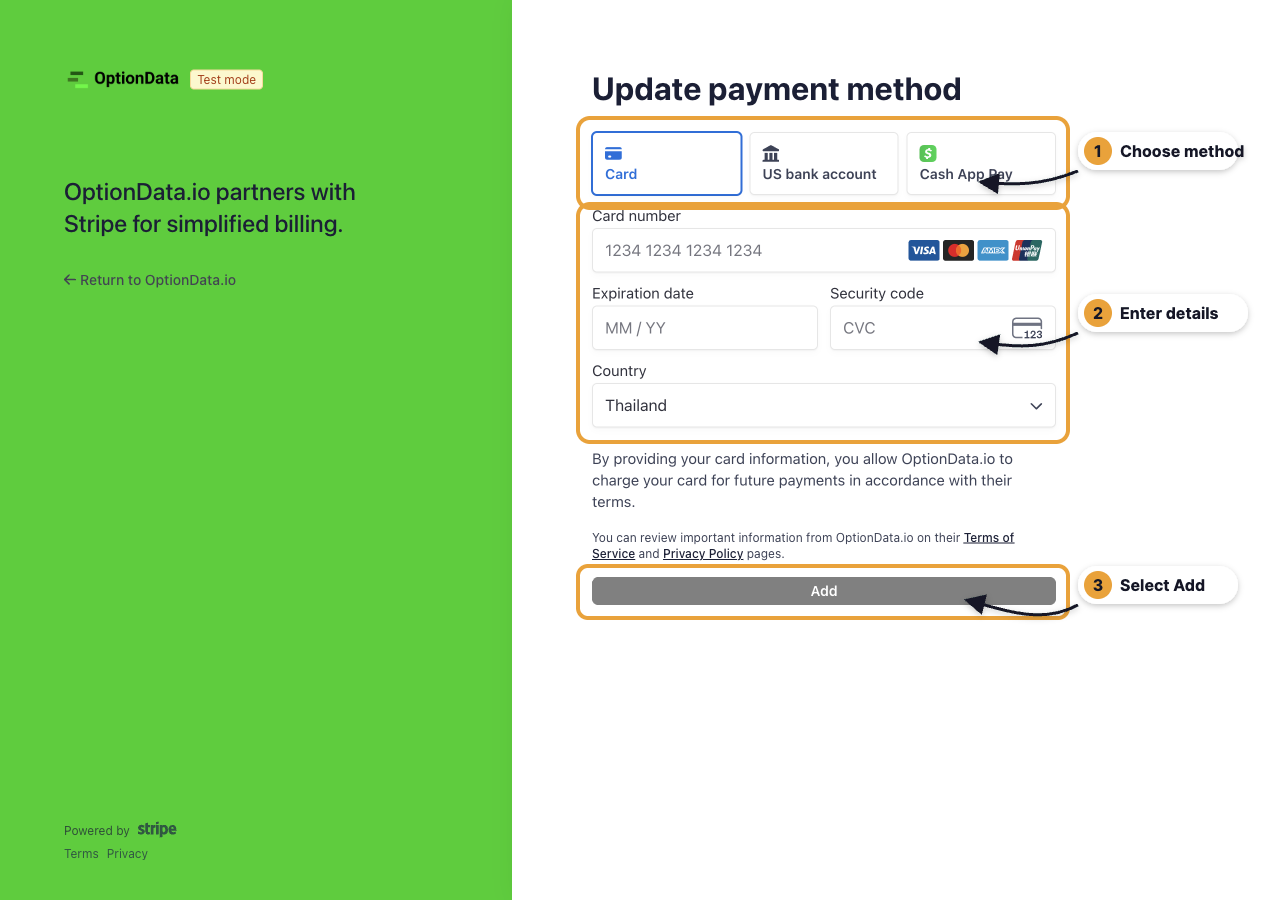
> **Screenshot note:** The example above was captured in Stripe test mode, so it contains no real payment information. Production follows the same steps without the **Test mode** badge.
## Step 3: Return to OptionData
After Stripe saves the payment method, it redirects you back to OptionData. The trial reminder disappears after OptionData confirms that Stripe can charge the trial subscription when it ends.
You can also open [Billing](/billing) to review your trial end date, subscription, and standard billing amount.
## If the reminder remains visible
1. Reload the OptionData page once.
2. Open [Billing](/billing) and select **Manage Subscription** to confirm the payment method in Stripe.
3. If Stripe shows the method but OptionData still shows the reminder, contact [OptionData Support](/support).
Do not send full card or bank details to OptionData support. Stripe should remain the only place where you enter that information.
## Frequently asked questions
### Will I be charged immediately?
Adding a payment method does not itself end the free trial. The subscription remains in its trial period until the scheduled end date.
### Why do I not see the reminder?
The reminder appears only for an active Pro Plan trial that does not already have a usable payment method. If you already added one, the reminder stays hidden.
### Can I update the payment method later?
Yes. Open [Billing](/billing), select **Manage Subscription**, and update the payment method in the Stripe customer portal.
## Manage Your Subscription and Billing
- HTML: https://www.optiondata.io/docs/manage-subscription/
- Markdown: https://www.optiondata.io/md/manage-subscription/
OptionData uses the Stripe customer portal for subscription and billing management.
## Open billing management
1. Sign in and open [Billing](/billing).
2. Review the plan name, standard amount, billing interval, and current status.
3. Select **Manage Subscription**.
4. OptionData opens a secure session at `https://billing.stripe.com/`.
Never enter payment information on a different domain.
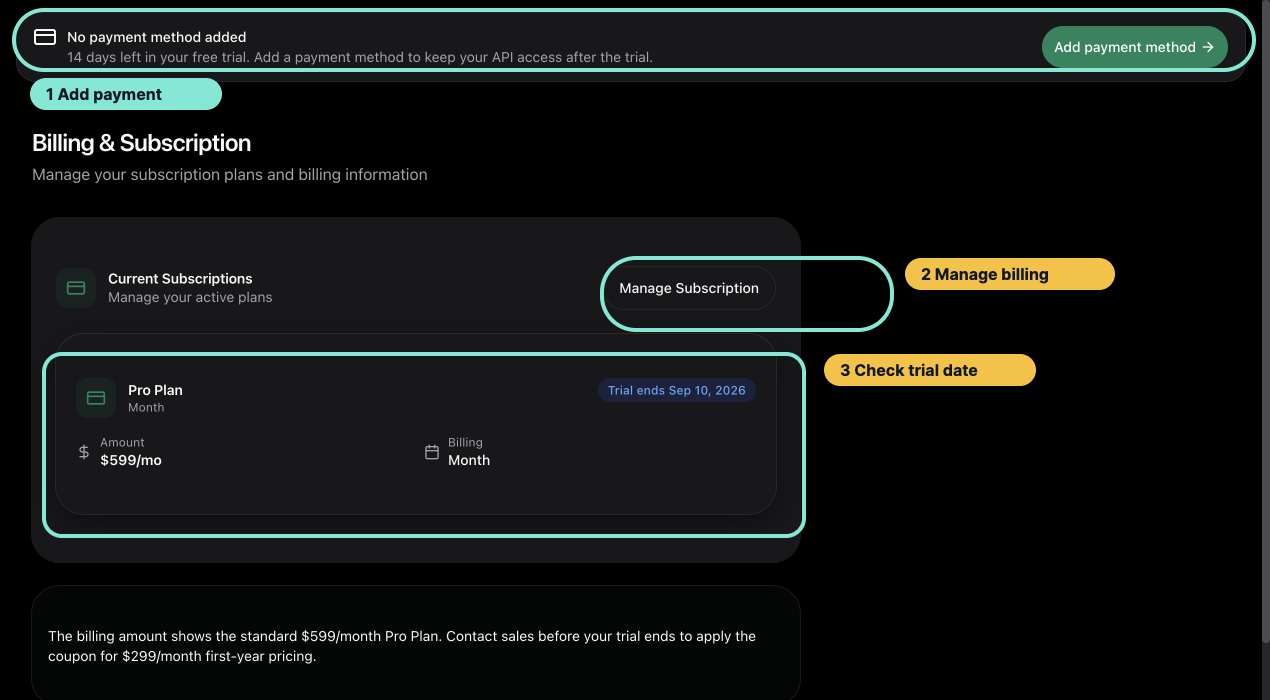
*Use the Billing page to confirm the subscription state and trial date before opening Stripe.*
## Add or update a payment method
Trial users without a usable payment method see an **Add payment method** reminder in the dashboard. Follow the annotated guide: [Add a Payment Method During Your Free Trial](/docs/add-payment-method).
To update a saved method later, open **Manage Subscription** and choose the payment-method action in Stripe.
## View invoices and billing history
Use the Stripe portal to review the invoice history available for your account. Download invoice or receipt records from Stripe rather than copying sensitive payment details into OptionData support messages.
## Cancel a subscription
Choose the cancellation action in Stripe and review the effective date before confirming. The portal confirmation is the authoritative description of whether access ends immediately or at the end of the billing period.
After returning to OptionData, refresh [Billing](/billing) if the new status is not visible yet.
## Promotional pricing
The Billing page shows the standard Pro Plan amount. If OptionData provided a first-year promotion, confirm that it has been applied before the trial ends. Contact [Support](/support) if the expected promotion is missing.
## Billing support safety
When contacting support, include your account email and a description of the issue. Never send a complete card number, bank account, CVC, or full API key.
## Realtime WebSocket Quickstart
- HTML: https://www.optiondata.io/docs/realtime-websocket-quickstart/
- Markdown: https://www.optiondata.io/md/realtime-websocket-quickstart/
Use test mode first to validate your WebSocket client without an API key, then switch to the authenticated live stream.
## 1. Validate the client in test mode
Connect to:
```text
wss://ws.optiondata.io?test_mode=true&aggregation_mode=AGGREGATED&symbols=AAPL
```
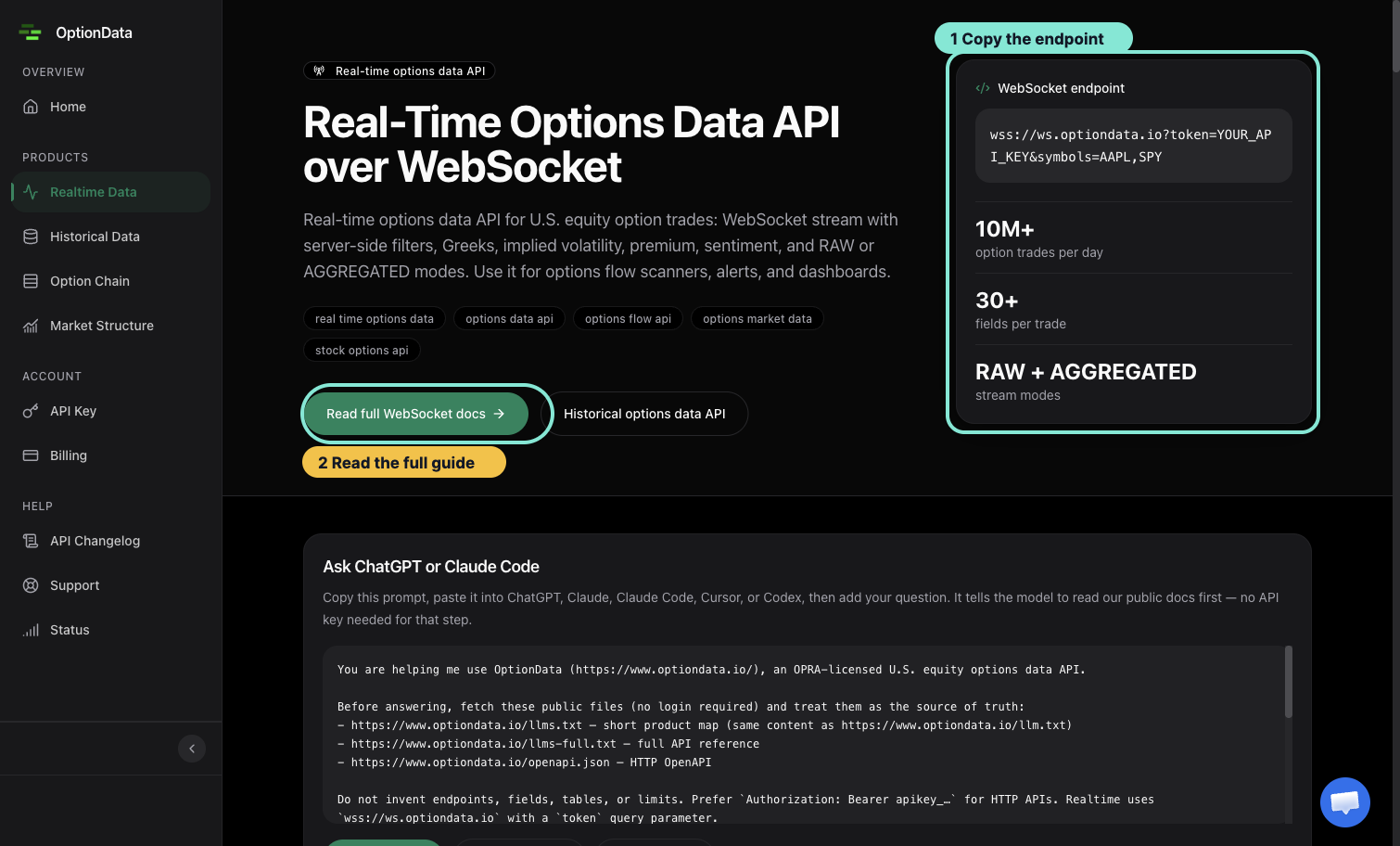
*The product page exposes the endpoint and links to the full filter and response reference.*
Test mode sends a finite sample snapshot and closes the connection. It proves that your client can connect, parse messages, and handle closure; it does not prove subscription entitlement or live market data.
## 2. Connect with Node.js
Install the WebSocket package:
```bash
npm install ws
```
Store your key in `OPTIONDATA_API_KEY`, then run:
```javascript
import WebSocket from 'ws';
const token = process.env.OPTIONDATA_API_KEY;
if (!token) throw new Error('OPTIONDATA_API_KEY is required');
const params = new URLSearchParams({
token,
symbols: 'AAPL,SPY',
aggregation_mode: 'AGGREGATED',
});
const ws = new WebSocket(`wss://ws.optiondata.io?${params}`);
ws.on('open', () => console.log('Connected'));
ws.on('message', (raw) => {
const message = JSON.parse(raw.toString());
console.log(message);
});
ws.on('close', (code, reason) => {
console.log('Closed', code, reason.toString());
});
ws.on('error', (error) => console.error('WebSocket error', error.message));
```
Do not log the full connection URL because it contains the API key.
## 3. Interpret the handshake
- HTTP `101` means the WebSocket upgrade succeeded.
- HTTP `401` means the token is missing, invalid, or stale.
- HTTP `403` means the customer was recognized but lacks active/trialing entitlement.
- HTTP `429` means the token reached a connection or rate limit; honor `Retry-After`.
Each token supports up to five concurrent WebSocket connections. Reuse connections and apply exponential backoff rather than opening connection loops.
During closed market hours, a successful live connection can have little or no new trade traffic. Connection success and message volume are separate checks.
For every filter and response field, use the [Realtime Option Trades API reference](/docs/realtime-option-trades-api).
## Historical SQL Quickstart
- HTML: https://www.optiondata.io/docs/historical-sql-quickstart/
- Markdown: https://www.optiondata.io/md/historical-sql-quickstart/
Historical SQL accepts read-only `SELECT` queries over HTTPS. The endpoint applies server-owned row, byte, and execution-time limits, and every visible trade is delayed by at least 15 minutes.
## 1. Start with a bounded query
This query filters by trading date and symbol, selects explicit columns, and limits output:
```sql
SELECT date, time, symbol, put_call, strike, expiration_date, size, price, bid, ask
FROM RawOptionTrades
WHERE date = (SELECT max(date) FROM RawOptionTrades)
AND symbol = 'AAPL'
ORDER BY time DESC
LIMIT 20
```
Filtering by `date` and `symbol` helps ClickHouse prune work. `LIMIT` caps returned rows, while OptionData's server-enforced read limits bound the scan itself.
## 2. Send the request
Store the key in `OPTIONDATA_API_KEY`, then use the canonical bearer header:
```bash
curl -X POST https://www.optiondata.io/api/historical/sql \
-H "Authorization: Bearer $OPTIONDATA_API_KEY" \
-H "Content-Type: application/x-www-form-urlencoded" \
--data-urlencode "sql=SELECT date, time, symbol, put_call, strike, expiration_date, size, price, bid, ask FROM RawOptionTrades WHERE date = (SELECT max(date) FROM RawOptionTrades) AND symbol = 'AAPL' ORDER BY time DESC LIMIT 20"
```
A successful response has `status: "SUCCESS"`, a `data` array, and entitlement/limit information in `meta`.
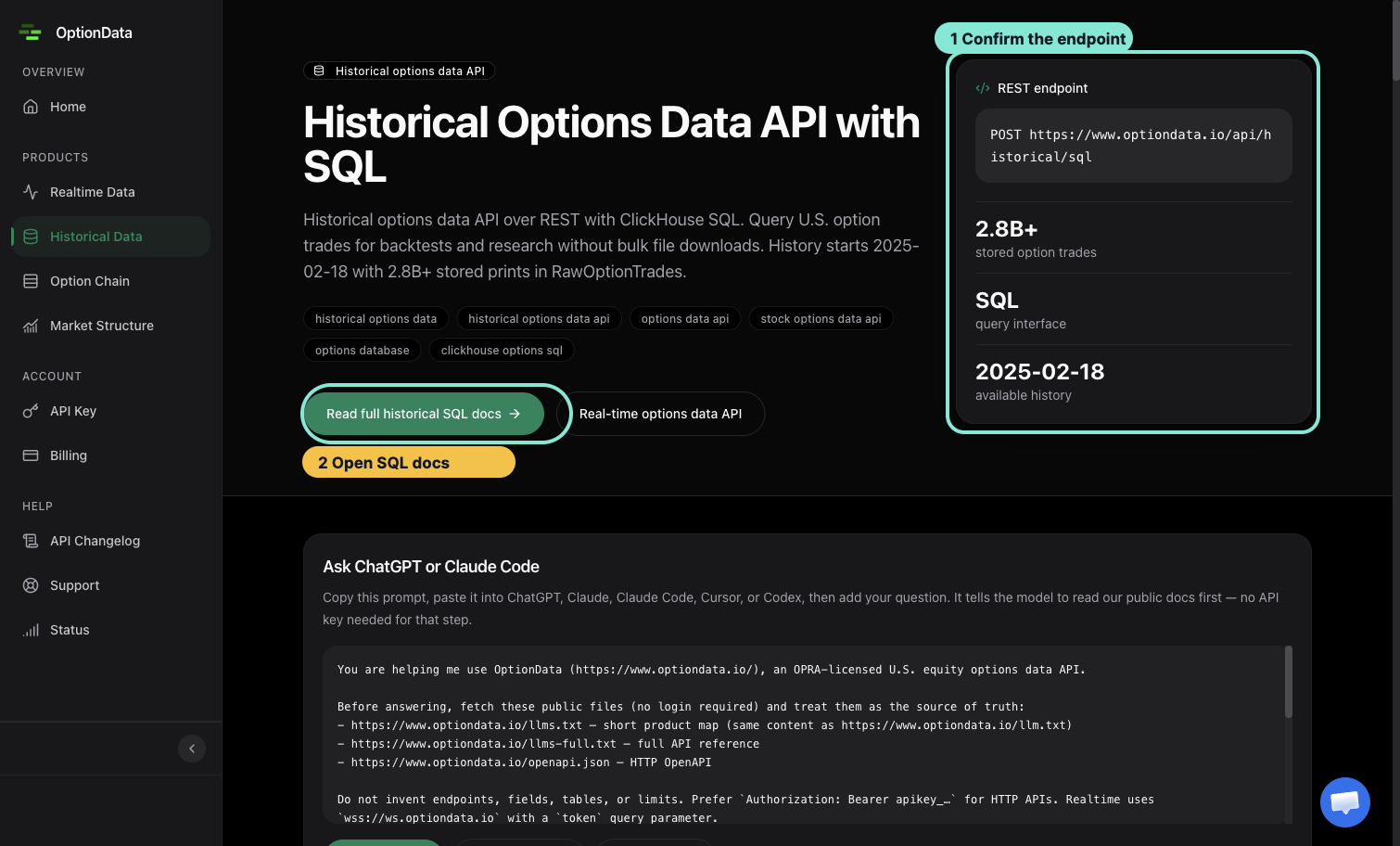
*Start from the documented REST endpoint, then use the bounded query shown below.*
Trial responses are capped at 10 rows even when the SQL uses a larger `LIMIT`.
## 3. Keep queries safe
- Query only published, whitelisted tables and columns.
- Filter by `date` and `symbol` before widening the request.
- Select only the columns you need.
- Include a reasonable `LIMIT`.
- Do not include semicolons, SQL comments, mutations, `UNION`, or query-level `SETTINGS`.
The public [Historical Option Trades API reference](/docs/historical-option-trades-api) is the schema source of truth for this restricted endpoint; system-table discovery is not part of the customer query surface.
## 4. Recover from errors
| Status | Meaning | Next action |
|---|---|---|
| `400` | SQL failed the public query guard | Correct the statement or column names |
| `401` | Missing or invalid API key | Check the bearer header |
| `403` | No active/trialing Pro entitlement | Review Billing |
| `422 QUERY_TOO_BROAD` | Server read limits were exceeded | Narrow date, symbol, expiry, or strike filters |
| `422 INVALID_QUERY` | ClickHouse rejected the expression | Correct the reported query problem |
| `429` | Rate limited | Honor `Retry-After` |
| `504` | Query timed out | Split the request into smaller windows |
Avoid repeatedly retrying the same broad query. Narrow it first.
## Option Chain Quickstart
- HTML: https://www.optiondata.io/docs/option-chain-quickstart/
- Markdown: https://www.optiondata.io/md/option-chain-quickstart/
The Option Chain API returns per-contract chain rows for one underlying. Omit `date` to use the latest available trading session.
## 1. Request a chain
Store your API key in `OPTIONDATA_API_KEY`, then run:
```bash
curl -X POST https://www.optiondata.io/api/option-chain \
-H "Authorization: Bearer $OPTIONDATA_API_KEY" \
-H "Content-Type: application/json" \
-d '{
"symbol": "AAPL",
"put_call": "CALL"
}'
```
The response contains:
- `data`: per-contract rows such as strike, expiration, bid/ask, open interest, IV, and Greeks.
- `meta.trading_date`: the trading session returned.
- `meta.as_of`: the latest update represented in the response, or `null` when unavailable.
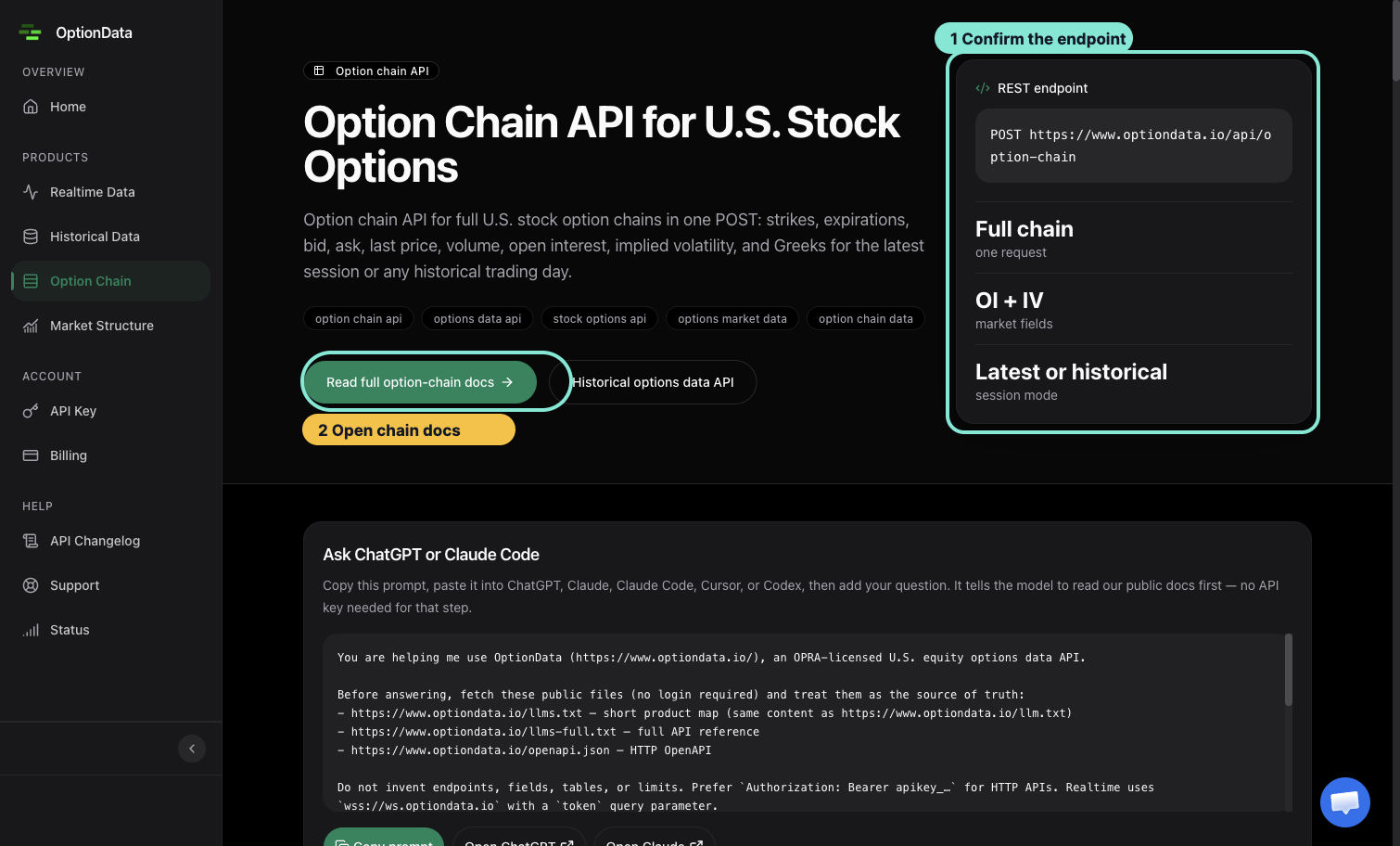
*The overview card distinguishes one-request full chains from the latest-or-historical session mode.*
## 2. Narrow a large chain
If the request returns HTTP `422`, narrow it with one or more supported filters:
```json
{
"symbol": "AAPL",
"expiration_date": "YYYY-MM-DD",
"put_call": "CALL",
"strike_min": 150,
"strike_max": 250
}
```
Use an expiration date that exists in the current chain. The endpoint rejects over-broad requests instead of silently returning a partial chain.
## 3. Choose a polling interval
- Broad or full-chain workflows: approximately every five minutes.
- Narrow symbol/expiry/strike workflows: approximately every one to two minutes.
- Honor HTTP `429` and its `Retry-After` header.
Faster polling rarely improves a chain workflow and can exhaust the per-key rate limit.
## 4. Understand access errors
- `401`: missing or invalid key.
- `403`: recognized customer without active/trialing entitlement.
- `422`: request too broad.
- `504`: query timed out; narrow the filters.
The Option Chain endpoint returns chain state, not the live trade stream. Use [Realtime WebSocket Quickstart](/docs/realtime-websocket-quickstart) for trades and flow.
See [Option Chain API](/docs/option-chain-api) for the complete request and response contract.
## Market Structure Quickstart
- HTML: https://www.optiondata.io/docs/market-structure-quickstart/
- Markdown: https://www.optiondata.io/md/market-structure-quickstart/
The Market Structure API returns a precomputed symbol-level snapshot. It combines structural GEX and open-interest levels with volatility context and a lightweight flow overlay.
## 1. Request the latest snapshot
Store your key in `OPTIONDATA_API_KEY`, then run:
```bash
curl "https://www.optiondata.io/api/v1/market-structure/SPY" \
-H "Authorization: Bearer $OPTIONDATA_API_KEY"
```
Use the exact option root. For index products, roots such as `SPX` and `SPXW` are distinct.
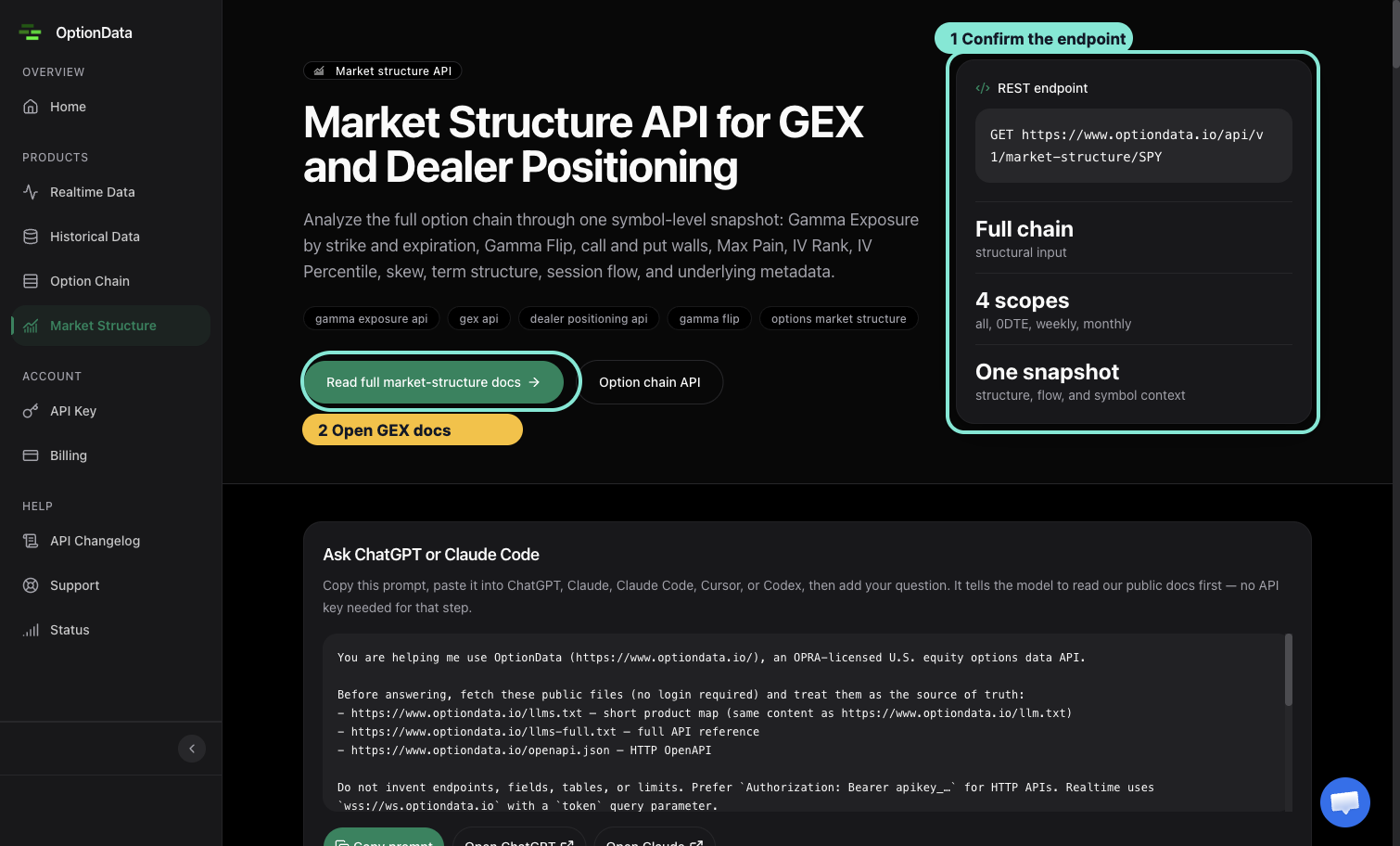
*The overview card is the starting point for the symbol-level snapshot request.*
## 2. Request a retained date
Add `date=YYYY-MM-DD` when you need a retained historical snapshot:
```bash
curl "https://www.optiondata.io/api/v1/market-structure/SPY?date=YYYY-MM-DD" \
-H "Authorization: Bearer $OPTIONDATA_API_KEY"
```
Not every calendar date or exact root has a retained snapshot.
## 3. Find the main sections
| Response path | Purpose |
|---|---|
| `data.symbol_meta` | Underlying description, prices, IV rank/percentile, skew, and term structure |
| `data.structure` | Spot, GEX/OI totals, Gamma Flip, walls, Max Pain, and expiration aggregates |
| `data.flow` | Lightweight session-flow overlay |
| `data.intraday_gex` | Latest intraday full-chain GEX summary when available |
| `meta.effective_date` | Trading date represented by the snapshot |
| `meta.*_as_of` | Freshness timestamps for the corresponding sections |
Treat walls and Gamma Flip as market-structure context, not guaranteed price targets.
## 4. Handle missing data correctly
- `401`: bearer key is missing or invalid.
- `403`: the customer lacks active/trialing entitlement.
- `404 SYMBOL_NOT_FOUND`: the exact option root is unknown.
- `404 SNAPSHOT_NOT_FOUND`: the root exists, but no snapshot was retained for that date.
- `429`: rate limited; honor `Retry-After`.
Use [Market Structure API](/docs/market-structure-api) for the complete field definitions and nullability contract.
## Realtime Option Trades API
- HTML: https://www.optiondata.io/docs/realtime-option-trades-api/
- Markdown: https://www.optiondata.io/md/realtime-option-trades-api/
The Realtime Option Trades API provides streaming access to option trade data.
- **WebSocket URL**: `wss://ws.optiondata.io`
## Request
### Parameters
| Name | Example | Required | Description |
| :--- | :--- | :--- | :--- |
| `token` | `YOUR_API_KEY` | Required | Get your API key here: [optiondata.io](https://optiondata.io/) |
| `aggregation_mode` | `AGGREGATED` or `RAW` | Optional, default value is AGGREGATED if leave blank | Determine how the option trades are aggregated by our algorithm. In AGGREGATED mode, the modified real-time feed combines option trades executed simultaneously for the same option symbol. In contrast, RAW mode keep the option trades in their original form without any modifications. |
| `symbols` | `SPY,TSLA,SPX` or `AAPL` | Optional field, leave it blank means no filtering | A list of symbols in upper case separated by comma. Using the * wildcard or don't provide it to subscribe to all symbols. |
| `premium` | `[100000,250000]` or `[100,null]` | Optional field, leave it blank means no filtering | The filter for minimum premium. The first value represents the minimum premium, while the second value indicates the maximum premium. If not provided, [0,null] will be the default value. |
| `sentiment` | `BULLISH,BEARISH,NEUTRAL` or `BULLISH` | Optional field, leave it blank means no filtering | The filter for sentiment includes potential values of BULLISH, BEARISH, and NEUTRAL. You can combine multiple selections by separating them with commas, such as NEUTRAL,BEARISH. |
| `underlying_type` | `STOCK,ETF,INDEX,ETN,REIT` | Optional field, leave it blank means no filtering | The filter for underlying_type includes potential values of STOCK, ETF, INDEX, ETN, and REIT. You can combine multiple selections by separating them with commas, such as INDEX,STOCK. |
| `delta` | `[-0.9,0.98]` | Optional field, leave it blank means no filtering | The filter for delta has a default range of [-1, 1]. The first value represents the minimum delta, while the second value indicates the maximum delta. The range must remain within [-1, 1] |
| `moneyness` | `ITM,OTM,ATM` | Optional field, leave it blank means no filtering | The filter for moneyness includes potential values of ITM, ATM, and OTM. You can combine multiple selections by separating them with commas, such as ITM,OTM. |
| `expiry_days` | `[15,20]` | Optional field, leave it blank means no filtering | The days remaining until the expiration date. The first number represents the minimum expiration days, with a default value of 0 if null is provided. The second number is the maximum expiration days; if null is provided, there is no limit. |
| `is_recent_earning_only` | `true` | Optional field, leave it blank means no filtering | Only trades on stocks with upcoming earnings. **AGGREGATED MODE only** |
| `put_call` | `CALL` or `PUT` | Optional field, leave it blank means no filtering | Filter to identify whether this option trade is PUT or CALL |
| `side` | `ASK,AASK,BID,BBID,MID` | Optional field, leave it blank means no filtering | Price side of the trade. Values: AASK (above ask), ASK, MID, BID, BBID (below bid). Comma-separated for multiple. |
| `strike` | `[15.5,20]` | Optional field, leave it blank means no filtering | Identity the range of the Strike price of the option trade. The first number represents the minimum strike price, with a default value of 0 if null is provided. The second number is the maximum strike price. if null is provided, there is no limit at the maximium strike price. default value is [0,null] with minimum strike price is $0, and no limit on the maximum strike price. |
| `oi` | `[155,2000]` | Optional field, leave it blank means no filtering | The total number of this options contract that are still open. The first number represents the minimum OI, with a default value of 0 if null is provided. The second number is the maximum OI. if null is provided, there is no limit at the maximium OI. default value is [0,null] with minimum OI is 0, and no limit on the maximum OI. |
| `iv` | `[0.1,1.1]` | Optional field, leave it blank means no filtering | Implied Volatility which reflects the market's expectations of the future volatility of the underlying asset's price. The first number represents the minimum IV, with a default value of 0 if null is provided. The second number is the maximum IV. if null is provided, there is no limit at the maximium IV. default value is [0,null] with minimum IV is 0, and no limit on the maximum IV. |
| `option_activity_type` | `AUTO` | Optional field, leave it blank means no filtering | OPRA trade condition code. Values: `AUTO` (AutoExecution), `SLAN` (SingleLegAuctionNonISO), `MLET` (MultiLegAutoEx), `MLAT` (MultiLegAuction), `ISOI` (IntermarketSweep), `MESL` (MultiLegAutoSingleLeg), `TLET` (StockOptionAutoEx), `SLFT` (SingleLegFloor), `MLFT` (MultiLegFloor), `CBMO` (MultiLegFloorPropProduct). **AGGREGATED MODE only** |
| `trade_count` | `[1,1]` or `[2,null]` | Optional field, leave it blank means no filtering | Number of trades involved in the sweep or trade. Use [1,1] to filter for block trades only, and [2,null] to filter for aggregated trades. In RAW mode, this is always 1. |
| `is_opening_only` | `true` | Optional field, leave it blank means no filtering | Only opening trades (2 × size >= OI + daily volume). **AGGREGATED MODE only** |
| `size` | `[155,2000]` | Optional field, leave it blank means no filtering | Filter for the total order size. The first number represents the minimum size, with a default value of 0 if null is provided. The second number is the maximum size if null is provided, there is no limit at the maximium size. default value is [0,null] with minimum size is 0, and no limit on the maximum size. |
| `dex` | `[100,500]` | Optional field, leave it blank means no filtering | The filter for Delta Exposure (DEX). The first value represents the minimum dex, while the second value indicates the maximum dex. If not provided, default is no filtering. |
| `dei` | `[0.1,0.5]` | Optional field, leave it blank means no filtering | The filter for Delta Impact (DEI). The first value represents the minimum dei, while the second value indicates the maximum dei. If not provided, default is no filtering. |
| `test_mode` | `true` | Optional | Enable test snapshot mode: server sends pre-loaded sample data and then closes the connection. No authentication required. Use to validate filters and client parsing before going live. |
### Sample Code
```typescript
import WebSocket from 'ws';
const url = "wss://ws.optiondata.io?symbols=AAPL,SPX&token=YOUR_API_KEY&premium=[300000,null]";
// Create a new WebSocket instance
const ws = new WebSocket(url);
// Event handler for connection open
ws.on('open', function open() {
console.log('WebSocket connection opened');
});
// Event handler for incoming messages
ws.on('message', function incoming(data) {
console.log('Received message:', data);
// You can parse and handle the data here
try {
const receivedData = JSON.parse(data.toString());
console.log('Parsed data:', receivedData);
// Further processing of receivedData
} catch (error) {
console.error('Error parsing received data:', error);
}
});
// Event handler for connection close
ws.on('close', function close() {
console.log('WebSocket connection closed');
});
// Event handler for errors
ws.on('error', function error(err) {
console.error('WebSocket error:', err);
});
```
```python
import asyncio
import websockets
import json
import datetime
from asyncio import Queue
# Set your WebSocket URL here
url = "wss://ws.optiondata.io?token=YOUR_API_KEY"
# If this runs in a managed notebook with an HTTP proxy, allow the WebSocket
# host through the proxy (for example: NO_PROXY=ws.optiondata.io,.optiondata.io).
# Create a global queue for demonstration
data_queue = Queue()
async def connect():
"""Connect to WebSocket and process messages."""
while True:
try:
async with websockets.connect(url, ping_interval=10, ping_timeout=15) as websocket:
print(f'[{datetime.datetime.utcnow()}] WebSocket connection opened')
try:
while True:
message = await websocket.recv()
print(f"[{datetime.datetime.utcnow()}] Message received: {message[:200]}{'...' if len(message) > 200 else ''}")
try:
received_data = json.loads(message)
option_symbol = received_data.get('option_symbol')
if received_data.get('daily_volume', 0) > 1000 and (
(received_data.get('price', 0) > 0.02 and option_symbol != "SPY")
or option_symbol == "SPY"
):
if option_symbol:
await data_queue.put(received_data) # Push to queue
print(f"[{datetime.datetime.utcnow()}] Queued data for option_symbol: {option_symbol}")
except json.JSONDecodeError as e:
print(f"[{datetime.datetime.utcnow()}] Error parsing received data: {e}")
except websockets.exceptions.ConnectionClosed as e:
print(f"[{datetime.datetime.utcnow()}] WebSocket connection closed: {e}, reconnecting immediately.")
except websockets.exceptions.WebSocketException as e:
print(f"[{datetime.datetime.utcnow()}] WebSocket error: {e}, reconnecting immediately.")
except Exception as e:
print(f"[{datetime.datetime.utcnow()}] Unexpected error: {e}, reconnecting immediately.")
print(f"[{datetime.datetime.utcnow()}] Waiting 2 seconds before reconnecting...")
await asyncio.sleep(2) # Backoff before reconnecting to avoid hammering the server
if __name__ == "__main__":
try:
asyncio.run(connect())
except KeyboardInterrupt:
print("Shutting down...")
```
```go
package main
import (
"fmt"
"log"
"os"
"os/signal"
"github.com/gorilla/websocket"
)
func main() {
// Define the URL of the WebSocket server
url := "wss://ws.optiondata.io?symbols=AAPL,SPX&token=YOUR_API_KEY&premium=[300000,null]"
// Connect to the WebSocket server
c, _, err := websocket.DefaultDialer.Dial(url, nil)
if err != nil {
log.Fatalf("Failed to connect to WebSocket server: %v", err)
}
defer c.Close()
// Handle interrupt signals to terminate gracefully
interrupt := make(chan os.Signal, 1)
signal.Notify(interrupt, os.Interrupt)
fmt.Println("WebSocket connection opened")
done := make(chan struct{})
// Goroutine for reading messages
go func() {
defer close(done)
for {
_, message, err := c.ReadMessage()
if err != nil {
log.Println("Error reading message:", err)
return
}
fmt.Printf("Received message: %s\n", message)
// Ideally, you would parse and handle the JSON message here
}
}()
// Main loop for handling program exit
for {
select {
case <-done:
return
case <-interrupt:
log.Println("Interrupt received, closing WebSocket connection...")
// To cleanly close the connection, send a close message and wait for the server to close the connection
err := c.WriteMessage(websocket.CloseMessage, websocket.FormatCloseMessage(websocket.CloseNormalClosure, ""))
if err != nil {
log.Println("Error during closing WebSocket connection:", err)
return
}
select {
case <-done:
}
return
}
}
}
```
## Response
### Schema
| Name | Type | Description |
| :--- | :--- | :--- |
| `id` | `string` | unique id for this option trade record |
| `symbol` | `string` | Ticker Symbol (`TSLA`, `MSFT`, etc...) |
| `date` | `string` | the date the trade was executed, the date format is `YYYY-MM-DD` |
| `time` | `string` | The time the trade was created. Format is `YYYY-MM-DD HH:MM:SS` |
| `put_call` | `string` | Indicates whether this trade is `PUT` or `CALL` |
| `strike` | `float` | Strike price of the option trade |
| `expiration_date` | `string` | The date on which the Option expires. The Option becomes invalid after this date and cannot be exercised ex: 2022-04-05 |
| `option_activity_type` | `string` | OPRA trade condition code (e.g., `"AUTO"`, `"SLAN"`). **AGGREGATED MODE only** |
| `underlying_type` | `string` | Indicates underlying is Common Stock, ETF, ETN, etc. |
| `oi` | `integer` | Open Interest. The total number of this options contract that are still open. |
| `size` | `integer` | Total order size (either of the 1 trade for the trade of SINGLE or REPEATED, or the sum of trade sizes for a AGGREGATED trade) |
| `price` | `float` | Last price of a trade, or last price of last trade in a sweep. |
| `underlying_price` | `float` | Current stock price of the underlying asset |
| `bid` | `float` | Option contract best bid |
| `ask` | `float` | Option contract best ask |
| `iv` | `float` | Implied volatility (IV) is an estimate of the future volatility of the underlying stock based on options prices. |
| `premium` | `float` | Cost in dollar of the entire sweep or block option trade |
| `sentiment` | `string` | BULLISH, BEARISH, or NEUTRAL The sentiment is estimated based on whether the trade was executed at the bid, ask, or spot price. |
| `trade_count` | `integer` | Number of trades involved in the sweep. In RAW mode, this is always 1. |
| `expiry_days` | `integer` | The days left to expiration date. |
| `side` | `string` | Price side: `"AASK"` (above ask), `"ASK"`, `"MID"`, `"BID"`, `"BBID"` (below bid) |
| `moneyness` | `string` | `"ITM"` (in the money), `"ATM"` (at the money), `"OTM"` (out of the money) |
| `delta` | `float` | Delta is a measure of the change in an option's price |
| `gamma` | `float` | Option gamma |
| `dex` | `number` | Delta exposure -- equivalent shares the dealer must hedge |
| `dei` | `number` | Delta exposure impact relative to daily stock volume |
| `daily_volume` | `integer` | Day volume for this option contract including this trade **AGGREGATED MODE only** |
| `earning_date` | `string` | Next earning date for the underlying asset **AGGREGATED MODE only** |
| `updated_timestamp` | `number` | UTC timestamp in milliseconds when this record was created |
| `market_cap` | `number` | Market capitalization in dollars (current share price × outstanding shares) **AGGREGATED MODE only** |
| `option_symbol` | `string` | Option Contract Symbol, for example: `TSLA240430P00508000`, this refers to a put option contract with a strike price of $508 and an expiration date of April 30, 2024. |
### Message format
When the WebSocket connects, the server sends a single **connection success** message. After that, each **trade record** is sent as an individual JSON message: the message body is the trade object itself (no `status` or `data` wrapper). Parse each incoming message as JSON; if it has a `status` field, treat it as control (e.g. `SUCCESS`); otherwise treat it as a trade record.
### Sample response
**When WebSocket connected (one-time):**
```json
{
"status": "SUCCESS",
"msg": "Connection established with id: 159b4576-70ec-476f-8a1d-b061fdca0fb8",
"data": {
"connection_id": "1707123456789-a1b2c3d4e5f6"
}
}
```
**When streaming data is received (each message is a plain trade object):**
```json
{
"id": "13k7t4e",
"date": "2025-05-02",
"time": "2025-05-02 09:53:51",
"symbol": "TSLA",
"put_call": "CALL",
"strike": 280,
"expiration_date": "2025-05-02",
"size": 7,
"price": 4.44,
"premium": 3109,
"bid": 4.38,
"ask": 4.5,
"underlying_price": 281.77,
"side": "MID",
"sentiment": "NEUTRAL",
"moneyness": "ITM",
"expiry_days": 0,
"option_symbol": "TSLA250502C00280000",
"trade_count": 2,
"dex": 413,
"dei": 0.00239,
"iv": 0.588,
"delta": 0.589,
"gamma": 0.0449,
"oi": 14410,
"daily_volume": 8352,
"underlying_type": "STOCK",
"option_activity_type": "SLAN",
"earning_date": "2025-07-21",
"market_cap": 900485935542,
"updated_timestamp": 1746194031262
}
```
### Response Error
**401 Unauthorized** (missing or invalid token, before WebSocket upgrade)
```json
{
"status": "ERROR",
"code": 401,
"msg": "Unauthorized, please login to https://optiondata.io get a valid API subscription plan first"
}
```
**500 Internal Error**
```json
{
"status": "ERROR",
"code": 500,
"msg": "Internal Error"
}
```
## Heartbeat
The server sends a ping message every **20 seconds** to keep the connection alive:
```json
{ "type": "ping", "ts": 1707123456789 }
```
Clients can optionally respond with a pong: `{ "type": "pong", "ts": 1707123456789 }`. If the client sends `{"type": "ping"}`, the server responds with `{"type": "pong", "ts": ...}`.
## Connection limits
Each API token is limited to **5 concurrent WebSocket connections**. When the limit is reached, a new WebSocket/SSE handshake is rejected with HTTP `429` and a `Retry-After` header; existing connections remain open. Respect the retry delay and use exponential backoff rather than opening another connection immediately.
## Test mode
Use `test_mode=true` to validate your integration without live market data. No token is required.
- **URL example:** `wss://ws.optiondata.io?test_mode=true&aggregation_mode=AGGREGATED&symbols=TSLA`
- After sending the connection success message, the server streams pre-loaded sample trade records (with your filters applied), then closes the connection with code `1000` and reason `"test_snapshot_complete"`.
- No heartbeat pings are sent in test mode. Connection limits are not enforced.
## FAQ
### What is an Aggregation Mode?
A: Real-time Option Trades in `AGGREGATED` mode consolidates trades with the same option symbol executed simultaneously (at the second level) into a single aggregate trade. This approach simplifies the identification of large trades that have been divided into multiple smaller transactions. If you want to see the original trades without any modification, please use `RAW` mode, the major differences between the two data feeds:
* The `trade_count` for option trades in `RAW` mode is always 1. In `AGGREGATED` mode, the `trade_count` can be either 1 or greater than 1. If it is greater than 1, this indicates that the option trade record aggregates multiple original option trades with the same option symbol that was executed simultaneously.
* The average daily volume for Real-time Option Trades in `AGGREGATED` mode is 4 million rows of records, while the average daily volume for `RAW` is around 7 million rows of records.
### How to choose between AGGREGATED mode and RAW mode?
A: Institutional players often divide large trades into smaller ones and execute them simultaneously. They do this either to hide their intentions or due to a lack of liquidity or market depth at the moment of execution. This is the background for why we introduced AGGREGATED mode, for the case that you need to identify significant block trades in real-time, you can select AGGREGATED mode, allowing our aggregation services to combine these trades. If you prefer no modifications to the trades, you can choose RAW mode instead. By default, the API uses AGGREGATED mode unless you specify a different value for the aggregation_mode field. Please note that this is an assumption that trades executed simultaneously are sent by the same trader/institution, otherwise, you can choose RAW mode instead.
### Can you give me some examples?
A: Let's say there are two records in real-time option trades with `RAW` mode like below:
```
// RAW MODE
date time symbol strike put_call expiration_date premium size trade_count
2025-02-01 09:32:02 TSLA 330 CALL 2025-02-15 1000 2 1
2025-02-01 09:32:02 TSLA 330 CALL 2025-02-15 2000 3 1
```
These two trades will be aggregated into one trade since they are executed at the same time with the same option symbol.
```
// AGGREGATED MODE
date time symbol strike put_call expiration_date premium size trade_count
2025-02-01 09:32:02 TSLA 330 CALL 2025-02-15 3000 5 2
```
For the example above, the size of trade in the `AGGREGATED` mode is equal to the sum of the size of the trades in the `RAW` mode(5 = 3 + 2), the trade size of trade in the `AGGREGATED` mode is equal to the sum of the trade_size in the `RAW` mode. For other data fields in `AGGREGATED` mode (eg: delta, iv, gamma, theta) is the average value of the related data field in the `RAW` mode.
### Is there a delay in the data?
A: Realtime WebSocket trades are **live** during market hours. We typically process around **20,000 records per minute**; the open may lag under surge. Historical SQL (separate product) enforces a minimum **15-minute** delay from each trade’s execution time.

### What is the typical daily volume?
A: On the order of **10M+** prints/day. **AGGREGATED** mode averages about **4M** records/day; **RAW** mode about **7M** records/day.
### What are connection and rate limits?
A: Each API token allows up to **5 concurrent WebSocket connections**. A sixth handshake receives HTTP **429** with `Retry-After`; existing connections are not evicted. Heartbeats run about every **20 seconds**. HTTP APIs (Historical SQL, Option Chain, Market Structure) default to about **60 requests per 60 seconds** per key (HTTP **429** + `Retry-After`).
### How to get started? Free trial length / extension?
A: Register at [https://www.optiondata.io](https://www.optiondata.io), complete the survey, start a **14-day** free Pro trial (**no credit card** required), copy your API key, connect to `wss://ws.optiondata.io`. Trials are **not auto-extended**; email [support@optiondata.io](mailto:support@optiondata.io) for case-by-case extensions. Discord: [https://discord.com/invite/mE5pEDMdWs](https://discord.com/invite/mE5pEDMdWs).
### What happens when the market closes?
A: When the market closes (5:00 PM ET), your WebSocket connection stays open. Data streaming stops, but heartbeat pings continue every 20 seconds. When the market reopens (9:30 AM ET, next trading day), data automatically resumes on the same connection -- no reconnection needed. If you connect outside market hours, authentication succeeds normally and you receive the connection success message, but no trade data is sent until the market opens. For historical data analysis outside market hours, use the Historical Option Data API.
### What does the Pro plan include? Refunds?
A: One Pro subscription covers **Realtime WebSocket**, **Historical SQL** (trial SQL capped at **10 rows**), **Option Chain REST**, and **Market Structure API** under one key. **30-day** money-back guarantee; cancel anytime. Refunds: email [support@optiondata.io](mailto:support@optiondata.io) from your login address within 30 days of purchase.
## Historical Option Trades API (SQL)
- HTML: https://www.optiondata.io/docs/historical-option-trades-api/
- Markdown: https://www.optiondata.io/md/historical-option-trades-api/
The Option Trades API provides secure access to historical option trading data through SQL queries. Every visible trade is at least 15 minutes old, measured from its execution timestamp.
## Endpoint
**POST** `https://www.optiondata.io/api/historical/sql`
Execute secure SELECT queries against option trades data.
### Headers
| Name | Value |
|------|-------|
| Content-Type | application/x-www-form-urlencoded |
### Request Body
| Name | Type | Required | Description |
|------|------|----------|-------------|
| api_key | string | Yes | Your API key. Get it from [https://optiondata.io](https://optiondata.io). |
| sql | string | Yes | The SQL query to execute. |
## Data Tables
### RawOptionTrades
This table contains all the historical trades.
**Notes:**
- Table names are case-insensitive.
- Invalid table names will result in an error.
- Only whitelisted tables are accessible.
## SQL Restrictions
### Allowed Operations
- SELECT statements only
- Standard SQL functions (COUNT, SUM, AVG, etc.)
- WHERE clauses with filtering
- ORDER BY and LIMIT clauses
- GROUP BY clauses
### Forbidden Operations
- INSERT, UPDATE, DELETE statements
- DROP, CREATE, ALTER statements
- UNION operations
- Stored procedures (EXEC, CALL)
- Comments in SQL (automatically stripped)
## Schema Definition
### Fields
| Name | Type | Description |
|------|------|-------------|
| date | Date | The date the trade was executed, format: YYYY-MM-DD. This column is the partition key. |
| time | DateTime64(3, 'America/New_York') | The timestamp of the trade with millisecond precision in America/New_York timezone. Format: YYYY-MM-DD HH:MM:SS.mmm. Part of primary key. |
| symbol | LowCardinality(String) | Ticker symbol (TSLA, AAPL, SPY, etc.). Part of primary key - filter by symbol for best performance. |
| put_call | Enum8('CALL' = 1, 'PUT' = 2) | Option type: 'CALL' or 'PUT'. |
| strike | Decimal(9,3) | Strike price of the option contract. Indexed column. |
| expiration_date | Date | The date on which the option expires, format: YYYY-MM-DD. Indexed column. |
| size | UInt32 | Number of contracts traded in this transaction. |
| price | Decimal(9,4) | Trade price per contract. |
| bid | Decimal(9,4) | Best bid price at time of trade. |
| ask | Decimal(9,4) | Best ask price at time of trade. |
| underlying_price | Decimal(9,4) | Price of the underlying stock at time of trade. |
| iv | Decimal(9,4) | Implied volatility (decimal, e.g. 0.35 = 35%). |
| delta | Decimal(9,4) | Option delta (-1 to 1). |
| gamma | Decimal(9,6) | Option gamma. |
| oi | UInt32 | Open Interest - total number of outstanding option contracts. |
| dei | Decimal(9,4) | Delta exposure impact relative to daily stock volume. |
### Derived Fields
These fields are not stored in `RawOptionTrades`. You can derive them in your application logic after receiving the raw data.
| Column | Status | Reason | Formula |
|--------|--------|--------|---------|
| id | Derivable | Frontend generates component keys | `sipHash64(concat(time, symbol, strike, price, size))` |
| trade_count | Derivable | RawOptionTrades stores individual trades only | `1` |
| expiry_days | Derivable | Simple date arithmetic | `dateDiff('day', date, expiration_date)` |
| premium | Derivable | Simple multiplication | `toFloat64(price) * size * 100` |
| option_symbol | Derivable | OCC format from components | `concat(symbol, YYMMDD, P/C, strike*1000)` |
| moneyness | Derivable | Compare strike vs underlying | `IF strike ~= underlying_price THEN 'ATM' ELSE IF ITM/OTM by put_call` |
| sentiment | Derivable | Inferred from side + put_call | `IF CALL+BUY='BULLISH', PUT+BUY='BEARISH', etc.` |
| side | Derivable | Compare price to bid/ask | `IF price > ask THEN 'AASK' ELSE IF price >= ask THEN 'ASK' ...` |
| daily_volume | Derivable | Aggregate from trades | `SUM(size) OVER (PARTITION BY date, symbol, strike, put_call, expiration_date)` |
| dex | Derivable | Delta exposure - equivalent shares the dealer must hedge | `delta * size * 100` |
## Examples
### Request Example
```
api_key=YOUR_API_KEY&sql=SELECT date, time, symbol, put_call, strike, expiration_date, size, price, bid, ask FROM RawOptionTrades WHERE date = (SELECT max(date) FROM RawOptionTrades) AND symbol = 'AAPL' ORDER BY time DESC LIMIT 20
```
### Code Examples
#### cURL
```bash
curl -X POST https://www.optiondata.io/api/historical/sql \
-H "Content-Type: application/x-www-form-urlencoded" \
-d "api_key=YOUR_API_KEY" \
--data-urlencode "sql=SELECT date, time, symbol, put_call, strike, expiration_date, size, price, bid, ask FROM RawOptionTrades WHERE date = (SELECT max(date) FROM RawOptionTrades) AND symbol = 'AAPL' ORDER BY time DESC LIMIT 20"
```
#### Python
```python
import http.client
conn = http.client.HTTPSConnection("www.optiondata.io")
payload = "api_key=YOUR_API_KEY&sql=SELECT%20date%2C%20time%2C%20symbol%2C%20put_call%2C%20strike%2C%20expiration_date%2C%20size%2C%20price%2C%20bid%2C%20ask%20FROM%20RawOptionTrades%20WHERE%20date%20%3D%20(SELECT%20max(date)%20FROM%20RawOptionTrades)%20AND%20symbol%20%3D%20'AAPL'%20ORDER%20BY%20time%20DESC%20LIMIT%2020"
headers = {
'Content-Type': 'application/x-www-form-urlencoded'
}
conn.request("POST", "/api/historical/sql", payload, headers)
res = conn.getresponse()
data = res.read()
print(data.decode("utf-8"))
```
#### JavaScript
```javascript
const axios = require('axios');
const qs = require('qs');
let data = qs.stringify({
'api_key': 'YOUR_API_KEY',
'sql': "SELECT date, time, symbol, put_call, strike, expiration_date, size, price, bid, ask FROM RawOptionTrades WHERE date = (SELECT max(date) FROM RawOptionTrades) AND symbol = 'AAPL' ORDER BY time DESC LIMIT 20"
});
let config = {
method: 'post',
maxBodyLength: Infinity,
url: 'https://www.optiondata.io/api/historical/sql',
headers: {
'Content-Type': 'application/x-www-form-urlencoded'
},
data : data
};
axios.request(config)
.then((response) => {
console.log(JSON.stringify(response.data));
})
.catch((error) => {
console.log(error);
});
```
### Sample SQL Queries
#### Latest Trading Date
```sql
SELECT max(date) AS latest_date
FROM RawOptionTrades
```
#### Latest Symbol Trades
```sql
SELECT date, time, symbol, put_call, strike, expiration_date, size, price, bid, ask
FROM RawOptionTrades
WHERE date = (SELECT max(date) FROM RawOptionTrades)
AND symbol = 'AAPL'
ORDER BY time DESC
LIMIT 20
```
#### Symbol Flow Aggregate
```sql
SELECT
symbol,
put_call,
COUNT(*) as total_trades,
SUM(size) as total_contracts,
ROUND(SUM(toFloat64(price) * size * 100), 2) as total_premium
FROM RawOptionTrades
WHERE date = (SELECT max(date) FROM RawOptionTrades)
AND symbol IN ('AAPL', 'TSLA', 'SPY')
GROUP BY symbol, put_call
ORDER BY total_premium DESC
LIMIT 12
```
#### Large Premium Trades
```sql
SELECT date, time, symbol, put_call, strike, expiration_date, size, price,
ROUND(toFloat64(price) * size * 100, 2) as premium
FROM RawOptionTrades
WHERE date = (SELECT max(date) FROM RawOptionTrades)
AND symbol IN ('AAPL', 'TSLA', 'SPY')
AND size >= 50
ORDER BY premium DESC
LIMIT 20
```
#### Date Range Rollup
```sql
SELECT
date,
symbol,
put_call,
COUNT(*) as total_trades,
SUM(size) as total_contracts,
ROUND(SUM(toFloat64(price) * size * 100), 2) as total_premium
FROM RawOptionTrades
WHERE date BETWEEN '2025-03-03' AND '2025-03-07'
AND symbol = 'AAPL'
GROUP BY date, symbol, put_call
ORDER BY date DESC, total_premium DESC
LIMIT 50
```
## Review Response
### Success (200 OK)
```json
{
"status": "SUCCESS",
"data": [
{
"date": "2025-01-17",
"time": "2025-01-17 09:30:15.123",
"symbol": "TSLA",
"put_call": "CALL",
"strike": 420.000,
"expiration_date": "2025-01-24",
"size": 10,
"price": 4.2500,
"bid": 4.2000,
"ask": 4.3000,
"underlying_price": 418.5200,
"iv": 0.4523,
"delta": 0.5234,
"gamma": 0.012345,
"oi": 15234,
"dei": 0.0012
}
],
"meta": {
"entitlement": "active",
"row_limit": 10000,
"capped": false,
"minimum_data_delay_minutes": 15
}
}
```
### Errors
**Invalid API Key**
```json
{
"status": "ERROR",
"errorMsg": "API Key is required"
}
```
**Invalid SQL**
```json
{
"status": "ERROR",
"errorMsg": "Invalid SQL query: Only SELECT queries are allowed"
}
```
**Invalid query fields or expressions (422 Unprocessable Content)**
```json
{
"status": "ERROR",
"errorCode": "INVALID_QUERY",
"reason": "UNKNOWN_IDENTIFIER",
"errorMsg": "The query references a column, alias, or table identifier that is not available."
}
```
Use `reason` to correct the query without relying on database-internal error text. Possible values are `UNKNOWN_IDENTIFIER`, `UNKNOWN_FUNCTION`, `TYPE_MISMATCH`, `NUMERIC_OVERFLOW`, `SYNTAX_ERROR`, `INVALID_AGGREGATION`, `INVALID_ARGUMENTS`, and `INVALID_EXPRESSION`.
`NUMERIC_OVERFLOW` means an arithmetic expression exceeded its supported numeric precision or range. Cast fixed-precision operands before multiplying or aggregating them, for example: `SUM(toFloat64(price) * size * 100)`.
`QUERY_TOO_BROAD` also uses HTTP 422 when a valid query exceeds server read limits. `QUERY_TIMEOUT` uses HTTP 504. Unexpected service or infrastructure failures use HTTP 500 with `INTERNAL_ERROR`.
Unexpected HTTP 500 responses include an `X-Request-Id` response header. Include that reference when contacting support; it identifies the request without exposing the submitted SQL.
## FAQ
**Q: What database technology do you use?**
A: ClickHouse over HTTPS. Submit SELECT-only SQL to `POST /api/historical/sql` against whitelisted tables (`RawOptionTrades` and related MVs).
**Q: What are the rate and row limits?**
A: About **60 requests per 60 seconds** per API key (HTTP **429** + `Retry-After` when exceeded). **Trialing** Pro users get up to **10 rows** per response; **paid** Pro unlocks up to about **10,000 rows** per response (server-configured). Prefer `LIMIT`, symbol, and date filters. Overly broad queries may return `QUERY_TOO_BROAD` or timeout.
**Q: When is the data updated (delay)?**
A: The API enforces a minimum **15-minute** delay from each trade’s execution timestamp. At 10:00:00 ET, the newest visible trade is from 09:45:00 ET or earlier. For live prints, use the Realtime WebSocket API.
**Q: How far back does historical data go?**
A: Trade history starts **2025-02-18** and covers each subsequent U.S. options session (2.8B+ trades and growing). Coverage adds about one trading day after each session settles.
**Q: What is typical daily volume on the related realtime stream?**
A: On the order of **10M+** prints/day overall. AGGREGATED mode ~**4M** records/day; RAW mode ~**7M** records/day. Historical SQL stores the raw tape.
**Q: Is the historical option data modified or aggregated?**
A: **No** — only raw, unmodified prints (unlike realtime AGGREGATED mode). Aggregate yourself with `SUM` / `COUNT` / `GROUP BY` when needed.
**Q: How does the free trial work? Can it be extended?**
A: New accounts get a **14-day** free Pro trial (no card required) including Historical SQL (10-row cap), Realtime WebSocket, Option Chain, and Market Structure under one key. Trials are **not auto-extended**; email **support@optiondata.io** for case-by-case extensions.
**Q: What does the Pro plan include / refunds?**
A: One Pro subscription covers all four products. **30-day** money-back guarantee; cancel anytime. Refunds: email support@optiondata.io from your login address within 30 days of purchase.
## Option Chain API
- HTML: https://www.optiondata.io/docs/option-chain-api/
- Markdown: https://www.optiondata.io/md/option-chain-api/
> **Beta.** This API is in beta testing. The request and response schema (fields,
> units, and semantics) may change.
The Option Chain API exposes per-contract chain rows for an underlying, for a given trading date:
```text
POST https://www.optiondata.io/api/option-chain
```
It is included with the realtime plan — both `trialing` and `active` realtime subscriptions get full access.
## Request
JSON and form (`application/x-www-form-urlencoded` / `multipart/form-data`) bodies are supported. Field names are **snake_case**.
Required:
- `symbol`: one underlying ticker (uppercased by the server; 1–16 chars).
Optional:
- `api_key`: `cus_...` (raw Stripe customer id) or a generated `apikey_...` token. If omitted, the signed-in session is used.
- `date`: `YYYY-MM-DD`. If omitted, the latest available date in `mv_contract_rank_flow` is used.
- `expiration_date`: `YYYY-MM-DD`.
- `put_call`: `CALL` or `PUT`.
- `strike`: exact strike price.
- `strike_min`, `strike_max`: inclusive strike bounds; either bound may be used alone.
## Source and semantics
Reads `mv_contract_rank_flow`, a per-contract-per-day materialized mart, with aggregate-state merge functions grouped by `option_symbol` for the requested `date`. Several fields are derived in the query (see the Response tables). Prices are in USD; Greeks/IV are decimals (e.g. IV `0.22` = 22%).
## Response — core fields (always returned)
`{ "data": [ ... ], "meta": { "trading_date": "YYYY-MM-DD", "as_of": "..." } }`
| Field | Type | Notes |
|---|---|---|
| `symbol` | string | Underlying ticker |
| `option_symbol` | string | OCC option symbol |
| `put_call` | `CALL` \| `PUT` | |
| `strike` | number \| null | Strike price |
| `expiration_date` | string \| null | `YYYY-MM-DD` |
| `bid` | number \| null | Best bid |
| `ask` | number \| null | Best ask |
| `last_price` | number \| null | Latest trade price |
| `open_interest` | number \| null | |
| `open_interest_change` | number \| null | `open_interest − prior-day OI` (prior OI null ⇒ treated as 0) |
| `volume` | number \| null | Daily volume |
| `implied_volatility` | number \| null | Decimal |
| `delta` / `gamma` / `theta` / `vega` | number \| null | Greeks (decimal) |
Numeric fields are `null` when the value is unavailable for a contract. This endpoint returns chain fields only; use the realtime WebSocket for flow fields such as premium, size, and trade count.
## Response — `meta`
| Field | Notes |
|---|---|
| `trading_date` | Trading session returned, in `YYYY-MM-DD` format |
| `as_of` | Most recent data update represented in the response, as a UTC ISO timestamp or `null` |
## Errors
All errors return `{ "error": { "code": "...", "message": "..." } }` with an HTTP status:
| Status | Meaning |
|---|---|
| `400` | Invalid body or failed request validation |
| `401` | Could not resolve a customer (missing/invalid `api_key` and no session) |
| `403` | Resolved, but no active/trialing realtime subscription |
| `422` | Request was too broad for the response guardrail |
| `429` | Rate limited; honor `Retry-After` |
| `504` | Query timed out |
| `500` | Unexpected server error |
## FAQ
**Q: How often should I poll?**
A: Broad/full-chain: about every **5 minutes**. Narrow symbol/expiry/strike: every **1–2 minutes**. Faster polling rarely helps and may hit rate limits.
**Q: Rate and size limits?**
A: About **60 requests / 60 seconds** per API key (HTTP **429**). The server rejects over-broad chains instead of returning partial results—use expiration, put/call, or strike filters.
**Q: History range and delay?**
A: Chain sessions from about **2026-02-20** forward (grows each trading day). Use `as_of` for freshness. For trade ticks back to **2025-02-18**, use Historical SQL (≥**15**-minute delay).
**Q: Free trial / extension?**
A: Included in the **14-day** Pro trial (and active Pro). Not auto-extended—email **support@optiondata.io**.
**Q: WebSocket full chain?**
A: No. Chains are REST only; WebSocket is trades/flow.
## Market Structure API (GEX)
- HTML: https://www.optiondata.io/docs/market-structure-api/
- Markdown: https://www.optiondata.io/md/market-structure-api/
The Market Structure API returns a **precomputed, symbol-level snapshot** of full-chain dealer-positioning structure (GEX), open interest walls, Max Pain, volatility context, and five-minute session flow plus intraday GEX summaries.
```text
GET https://www.optiondata.io/api/v1/market-structure/:symbol
```
Included with the realtime plan (`trialing` or `active`). Authenticate with a signed API key.
## Authentication
Send your API key as:
```http
Authorization: Bearer YOUR_API_KEY
```
`YOUR_API_KEY` may be a raw Stripe customer id (`cus_...`) or a portal-minted `apikey_...` token.
## Path parameters
| Name | Required | Description |
|------|----------|-------------|
| `symbol` | Yes | Underlying option root (e.g. `SPY`, `SPXW`, `AAPL`). Uppercased server-side. |
## Query parameters
| Name | Required | Description |
|------|----------|-------------|
| `date` | No | `YYYY-MM-DD` retained historical snapshot. Omit for the active/latest snapshot. |
## Example
```bash
curl "https://www.optiondata.io/api/v1/market-structure/SPY" \
-H "Authorization: Bearer YOUR_API_KEY"
curl "https://www.optiondata.io/api/v1/market-structure/SPY?date=2026-07-24" \
-H "Authorization: Bearer YOUR_API_KEY"
```
## Response shape
Top-level:
| Field | Type | Description |
|-------|------|-------------|
| `data.symbol` | string | Exact option root requested |
| `data.symbol_meta` | object | Underlying metadata and volatility context |
| `data.flow` | object | Lightweight traded-flow overlay for the symbol |
| `data.intraday_gex` | object \| null | Latest full-chain summary GEX and spot |
| `data.structure` | object | Full-chain GEX, OI, levels, strike-by-expiration aggregates |
| `meta.effective_date` | string | Snapshot trading date (`YYYY-MM-DD`) |
| `meta.structure_as_of` | string | UTC time when structure metrics were produced |
| `meta.flow_as_of` | string | UTC time of the flow overlay |
| `meta.intraday_gex_as_of` | string \| null | UTC time of the intraday GEX summary |
### `symbol_meta` highlights
| Field | Type | Description |
|-------|------|-------------|
| `underlying_type` | `STOCK \| ETF \| INDEX \| null` | Underlying classification |
| `description` | string | Company, fund, or index name |
| `open / high / low / close / last` | number | Snapshot-date underlying prices |
| `iv30` | number \| null | Interpolated 30-day ATM implied volatility (decimal) |
| `iv_rank_1y` / `iv_percentile_1y` | number \| null | One-year IV rank / percentile as 0–1 fractions |
| `skew_25d_30d` | number \| null | 30-day 25-delta put/call skew |
| `iv_term_slope_30_90` | number \| null | 30-to-90-day IV term slope |
### `structure` highlights
| Field | Type | Description |
|-------|------|-------------|
| `spot` | number | Underlying price used for exposure calculations |
| `call_oi` / `put_oi` | number | All-scope open-interest contract totals |
| `call_gex` / `put_gex` | number | All-scope dollar GEX for a 1% move; put GEX is signed negative |
| `scopes.all` / `zero_dte` / `weekly` / `monthly` | object \| null | Levels scoped by DTE bucket |
| `gamma_flip` | number \| null | Nearest repriced zero-net-GEX underlying level |
| `max_pain` | number \| null | Strike with lowest multiplier-adjusted aggregate payout |
| `call_gex_wall` / `put_gex_wall` | number \| null | Strongest call/put GEX strike on the corresponding side of spot |
| `call_oi_wall` / `put_oi_wall` | number \| null | Highest call/put OI strike on the corresponding side of spot |
| `expirations` | array | Full-chain strike aggregates grouped by expiration |
### `flow` highlights
| Field | Type | Description |
|-------|------|-------------|
| `call_premium` / `put_premium` | number | Session option premium by side (USD) |
| `bullish_dex` / `bearish_dex` | number | Bullish and bearish delta-exposure flow totals |
| `trade_count` | number | Option trades represented by the overlay |
| `traded_contract_count` | number | Distinct contracts with trades |
### `intraday_gex` highlights
| Field | Type | Description |
|-------|------|-------------|
| `spot` | number | Latest positive underlying price used for the summary |
| `call_gex` | number | Full-chain positive call dollar GEX, including zero-trade contracts |
| `put_gex` | number | Full-chain signed-negative put dollar GEX, including zero-trade contracts |
## Semantics notes
- **Dealer positioning is a model**, not reported dealer inventory. Put GEX uses a documented dealer-short-put signing convention.
- **Net GEX** can be derived as `call_gex + put_gex` (put already signed).
- `data.intraday_gex` and `meta.intraday_gex_as_of` can refresh every five minutes during the regular session. Structural strike GEX, walls, Gamma Flip, Max Pain, OI, expirations, and `meta.structure_as_of` change only during structural builds.
- **Put/call OI ratio** can be derived as `put_oi / call_oi` when `call_oi > 0`.
- Prefer Market Structure for positioning dashboards; use the Option Chain API when you need filterable contract-level quotes and Greeks.
## Errors
| Status | Meaning |
|--------|---------|
| `400` | Invalid symbol or date |
| `401` | Missing or invalid API key |
| `403` | No active/trialing realtime entitlement |
| `404` | Snapshot not found for symbol/date |
| `429` | Rate limited |
| `500` | Unexpected server error |
## FAQ
**Q: Rate limits and access?**
A: Requires trialing or active Pro + API key. About **60 requests / 60 seconds** per key (HTTP **429**). Same plan as Option Chain and Historical SQL.
**Q: Freshness?**
A: Structural levels update on builds (`structure_as_of`). Some intraday GEX fields can refresh about every **five minutes** in session—use response meta timestamps.
**Q: History range?**
A: Snapshot history aligns with chain-style sessions from about **2026-02-20**. Deep trade history: Historical SQL from **2025-02-18**.
**Q: Free trial / extension?**
A: Included in the **14-day** Pro trial. Not auto-extended—email **support@optiondata.io**.
**Q: Market Structure vs Option Chain?**
A: Structure for GEX/walls/max pain dashboards; Option Chain for filterable contract quotes/Greeks.
## Related
- Product page: [/market_structure](/market_structure/)
- Option chain API: [/docs/option-chain-api/](/docs/option-chain-api/)
- Realtime flow: [/docs/realtime-option-trades-api/](/docs/realtime-option-trades-api/)
## Options Data Basic Concepts
- HTML: https://www.optiondata.io/docs/basic-concepts/
- Markdown: https://www.optiondata.io/md/basic-concepts/
> **Data Reference**: [Data Structure](./data_structure.md)
> **Last Updated**: 2026-01-20
This document summarizes key concepts from the OptionData product documentation for internal reference. It is organized into foundational concepts, core Greeks & metrics, market structure indicators, and real-time flow analysis. **Field names referenced here (e.g., `side`, `sentiment`, `dex`) correspond to the actual data fields documented in [Data Structure](./data_structure.md).**
---
## Table of Contents
1. [Quick Reference Tables](#quick-reference-tables)
- [Trade Execution Side](#trade-execution-side-side-field)
- [Buy vs Sell: Inferring Trade Direction](#buy-vs-sell-inferring-trade-direction)
- [Sentiment Derivation](#sentiment-derivation-sentiment-field)
- [Trade Activity Types](#trade-activity-types-option_activity_type-field)
- [Moneyness Classification](#moneyness-classification-moneyness-field)
2. [Foundational Concepts](#foundational-concepts)
- [Data-Driven Trading Strategy](#data-driven-trading-strategy)
- [Understanding Option Quotes](#understanding-option-quotes)
- [Options Dictionary](#options-dictionary)
3. [Core Greeks & Metrics](#core-greeks--metrics)
- [Delta Exposure (DEX)](#delta-exposure-dex)
- [Delta Impact (DEI)](#delta-impact-dei)
- [Gamma Exposure (GEX)](#gamma-exposure-gex)
- [Call Wall vs Put Wall](#call-wall-vs-put-wall)
- [Gamma Squeeze](#gamma-squeeze)
- [The 0DTE Phenomenon](#the-0dte-phenomenon)
- [Implied Volatility (IV)](#implied-volatility-iv)
4. [Option Chain Analysis](#option-chain-analysis)
- [Option Chain vs Option Flow](#option-chain-vs-option-flow)
- [Open Interest (OI)](#open-interest-oi)
- [Analyzing OI Changes & Trade Intent](#analyzing-oi-changes--trade-intent)
---
## Quick Reference Tables
### Trade Execution Side (`side` field)
The `side` field indicates where the trade was executed relative to the bid-ask spread:
| Side Value | Description | Interpretation |
|------------|-------------|----------------|
| **AASK** | Above Ask | Very aggressive buyer - strong conviction |
| **ASK** | At Ask | Aggressive buyer - willing to pay the offer |
| **MID** | Between Bid/Ask | Neutral execution - could be either party |
| **BID** | At Bid | Aggressive seller - hitting the bid |
| **BBID** | Below Bid | Very aggressive seller - desperate to exit |
> [!TIP]
> **Side classification logic**:
> ```
> AASK = price > ask (Above Ask)
> ASK = price >= ask (At Ask)
> MID = price between bid/ask (Mid)
> BID = price <= bid (At Bid)
> BBID = price < bid (Below Bid)
> ```
### Buy vs Sell: Inferring Trade Direction
In options flow data, we don't have a direct "buy" or "sell" flag. Instead, we **infer the likely aggressor** (buyer or seller) based on where the trade executed relative to the bid-ask spread.
#### The Bid-Ask Spread Concept
```
BID ASK
│ │
▼ ▼
┌─────────────────────────────────────────┐
│ Sellers willing │ Buyers willing │
│ to sell at BID │ to buy at ASK │
└─────────────────────────────────────────┘
│
MID
```
- **BID price**: The highest price a buyer is willing to pay
- **ASK price**: The lowest price a seller is willing to accept
- **Spread**: The difference between ASK and BID
#### Who is the Aggressor?
| Trade Executes At | Likely Aggressor | Why? |
|-------------------|------------------|------|
| **ASK or above** | **BUYER** | Buyer is "crossing the spread" — paying the seller's asking price to get filled immediately |
| **BID or below** | **SELLER** | Seller is "hitting the bid" — accepting the buyer's bid price to exit immediately |
| **MID** | **Unknown** | Could be negotiated trade, spread trade, or market maker activity |
> [!IMPORTANT]
> **Key insight**: The aggressor pays a premium for immediacy.
> - A buyer paying ASK wants to get in NOW (urgency = conviction)
> - A seller hitting BID wants to get out NOW (urgency = conviction or desperation)
#### Connecting to Sentiment
Once we know the likely aggressor (buyer vs seller) and the option type (CALL vs PUT), we can infer sentiment:
| Option Type | Aggressor | Action | Market View |
|-------------|-----------|--------|-------------|
| CALL | Buyer (at ASK) | Opening long call or closing short call | **Bullish** |
| CALL | Seller (at BID) | Opening short call or closing long call | **Bearish** |
| PUT | Buyer (at ASK) | Opening long put or closing short put | **Bearish** |
| PUT | Seller (at BID) | Opening short put or closing long put | **Bullish** |
### Sentiment Derivation (`sentiment` field)
The `sentiment` field is derived from the combination of `put_call` and `side`:
| `put_call` | `side` | `sentiment` | Interpretation |
|------------|--------|-------------|----------------|
| CALL | AASK/ASK | **BULLISH** | Buyer paying up for calls = expects upside |
| CALL | BID/BBID | **BEARISH** | Seller dumping calls = closing or hedging |
| PUT | AASK/ASK | **BEARISH** | Buyer paying up for puts = expects downside |
| PUT | BID/BBID | **BULLISH** | Seller closing puts = less concerned about downside |
| Any | MID | **NEUTRAL** | Indeterminate - could be either party |
### Trade Activity Types (`option_activity_type` field)
#### Quick Reference Codes
| Code | Full Name | Description |
|------|-----------|-------------|
| **AUTO** | Auto Execution | Standard electronic matching |
| **SLAN** | Stock-Option AIM | Intermarket sweep linked order |
| **MLET** | Multi-Leg Electronic | Multi-leg strategy execution |
| **SLAI** | AIM Stock/Option | AIM-linked stock/option order |
| **MAIM** | Multi-Leg AIM | Complex multi-leg AIM execution |
| **MLAI** | Multi-Leg AIM Interactive | Interactive multi-leg via AIM |
| **MLAT** | Multi-Leg Auto Trade | Automated multi-leg execution |
| **SHOT** | Stock-Option Order | Stock + option combo order |
| **ISOI** | ISO Intermarket | Intermarket price protection |
> [!NOTE]
> These codes come from the exchange and indicate the execution mechanism. For most analysis purposes, you can focus on trade size, premium, and sentiment rather than activity type.
#### Trade Condition Codes
| Condition | Description |
|-----------|-------------|
| **Regular** | Transaction was a regular sale without stated conditions |
| **AutoExecution** | Transaction was executed electronically; Processed like a regular trade |
| **IntermarketSweep** | Transaction was the execution of an order identified as an Intermarket Sweep Order |
| **StockContingent** | Transaction represents multi-leg option/stock trade |
| **MultiLeg** | Transaction represents a leg of a multi-leg option trade |
| **MultiLegProprietaryProduct** | Transaction represents execution of a proprietary product such as index options non-electronic. The trade price may be outside the current NBBO |
#### Detailed Trade Descriptions
| Trade Type | Description |
|------------|-------------|
| **Single Leg Auction Non ISO** | Execution of an electronic order "stopped" at a price and traded in a two-sided auction mechanism through an exposure period (Price Improvement, Facilitation, or Solicitation) |
| **Single Leg Auction ISO** | Execution of an Intermarket Sweep electronic order "stopped" at a price and traded in a two-sided auction mechanism through an exposure period, marked as ISO |
| **Single Leg Cross Non ISO** | Execution of an electronic order "stopped" at a price and traded in a two-sided crossing mechanism without exposure period (Customer to Customer Cross, QCC with single option leg) |
| **Single Leg Cross ISO** | Execution of an Intermarket Sweep electronic order "stopped" at a price and traded in a two-sided crossing mechanism without exposure period |
| **Single Leg Floor Trade** | Non-electronic trade executed on a trading floor, including Paired and Non-Paired Auctions and Cross orders |
| **Multi Leg autoelectronic trade** | Electronic execution of a multi-leg order traded in a complex order book |
| **Multi Leg Auction** | Execution of an electronic multi-leg order "stopped" at a price and traded in a two-sided auction mechanism through an exposure period in a complex order book |
| **Multi Leg Cross** | Execution of an electronic multi-leg order "stopped" at a price and traded in a two-sided crossing mechanism without exposure period (Customer to Customer Cross, QCC with 2+ options legs) |
| **Multi Leg floor trade** | Non-electronic multi-leg order trade executed on a trading floor against other multi-leg orders, including Paired and Non-Paired Auctions |
| **Multi Leg autoelectronic trade against single leg(s)** | Electronic execution of a multi-leg order traded against single leg orders/quotes |
| **Stock Options Auction** | Execution of an electronic multi-leg stock/options order "stopped" at a price and traded in a two-sided auction mechanism through an exposure period |
| **Multi Leg Auction against single leg(s)** | Execution of an electronic multi-leg order "stopped" at a price and traded in a two-sided auction mechanism through an exposure period against single leg orders/quotes |
| **Multi Leg floor trade against single leg(s)** | Non-electronic multi-leg order trade executed on a trading floor against single leg orders/quotes, including Paired and Non-Paired Auctions |
| **Stock Options autoelectronic trade** | Electronic execution of a multi-leg stock/options order traded in a complex order book |
| **Stock Options Cross** | Execution of an electronic multi-leg stock/options order "stopped" at a price and traded in a two-sided crossing mechanism without exposure period |
| **Stock Options floor trade** | Non-electronic multi-leg stock/options trade executed on a trading floor in a complex order book, including Paired and Non-Paired Auctions and Cross orders |
| **Stock Options autoelectronic trade against single leg(s)** | Electronic execution of a multi-leg stock/options order traded against single leg orders/quotes |
| **Stock Options Auction against single leg(s)** | Execution of an electronic multi-leg stock/options order "stopped" at a price and traded in a two-sided auction mechanism through an exposure period against single leg orders/quotes |
| **Stock Options floor trade against single leg(s)** | Non-electronic multi-leg stock/options order trade executed on a trading floor against single leg orders/quotes, including Paired and Non-Paired Auctions |
| **Multi Leg Floor Trade of Proprietary Products** | Execution of a proprietary product non-electronic multi-leg order with at least 3 legs. The trade price may be outside the current NBBO |
| **Multilateral Compression Trade of Proprietary Products** | Execution in a proprietary product done as part of a multilateral compression. Trades are executed outside regular trading hours at prices derived from end-of-day markets. Does not update Open, High, Low, and Closing Prices |
| **Extended Hours Trade** | Trade executed outside of regular market hours. Does not update Open, High, Low, and Closing Prices |
### Moneyness Classification (`moneyness` field)
| Value | Description | Typical Usage |
|-------|-------------|---------------|
| **ITM** | In The Money | Strike favorable vs current price |
| **ATM** | At The Money | Strike ≈ current price |
| **OTM** | Out of The Money | Strike unfavorable vs current price |
---
## Foundational Concepts
### Data-Driven Trading Strategy
**Definition**: An approach to investment using data and analytics to make informed trading decisions based on objective information rather than subjective chart interpretations.
**Key Advantages**:
- Uses historical data, current market conditions, and company performance
- Identifies patterns and trends not immediately apparent through technical analysis
- More reliable than technical analysis alone (less influenced by personal biases)
**OptionData Application**: The Smart Option Flow identifies trading opportunities when option prices deviate significantly from expected values due to unusual trading activity, providing insights into market sentiment.
### Understanding Option Quotes
An option **quote** is not a single price, but a two-way price structure known as the **NBBO** (National Best Bid and Offer) that represents the market's current willingness to trade.
#### Components of a Quote
| Component | Definition | Represents |
|-----------|------------|------------|
| **Bid Price** | The highest price a buyer is publicly offering. | Market's "floor" (Sell Price) |
| **Ask Price** | The lowest price a seller is publicly accepting. | Market's "ceiling" (Buy Price) |
| **Bid Size** | Number of contracts buyers want at the Bid Price. | Demand liquidity |
| **Ask Size** | Number of contracts sellers offer at the Ask Price. | Supply liquidity |
| **Spread** | Difference between Ask and Bid (`Ask - Bid`). | Cost of liquidity |
> [!NOTE]
> **Example Quote**: `Bid: $2.50 x 50` | `Ask: $2.55 x 100`
> - **Sell immediately** at **$2.50** (hit the bid).
> - **Buy immediately** at **$2.55** (take the ask).
> - **Liquidity**: Market is deeper on the sell side (100 contracts) than the buy side (50 contracts).
#### Why Quotes Matter
1. **Liquidity & Slippage**: A tight spread (e.g., $0.05) indicates high liquidity. A wide spread (e.g., $0.50 on a $2.00 option) implies low liquidity, meaning you lose more value just by entering/exiting the trade.
2. **Trade Inference**: As explained in the [Buy vs Sell](#buy-vs-sell-inferring-trade-direction) section, we use the Bid/Ask prices to infer whether a trade was initiated by a buyer (Ask side) or seller (Bid side).
---
### Options Dictionary
#### Core Data Fields
| Term | Data Field | Definition |
|------|------------|------------|
| **Put/Call** | `put_call` | Option type: `CALL` (right to buy) or `PUT` (right to sell) |
| **Strike** | `strike` | Price at which the option can be exercised |
| **Expiration** | `expiration_date` | Date when the option contract expires |
| **Days to Expiration** | `expiry_days` | Number of days until expiration (DTE) |
| **Size** | `size` | Number of contracts traded |
| **Premium** | `premium` | Total dollar value of trade (`price × size × 100`) |
| **Underlying Price** | `underlying_price` | Stock price at trade execution |
#### Derived Metrics
| Term | Data Field | Definition |
|------|------------|------------|
| **Moneyness** | `moneyness` | Relationship between strike and underlying: `ITM`, `ATM`, `OTM` |
| **Side** | `side` | Trade execution location: `AASK`, `ASK`, `MID`, `BID`, `BBID` |
| **Sentiment** | `sentiment` | Inferred outlook: `BULLISH`, `BEARISH`, `NEUTRAL` |
| **Delta Exposure (DEX)** | `dex` | Directional exposure = `delta × size` |
| **Delta Impact (DEI)** | `dei` | Flow relative to liquidity = `dex ÷ avg_daily_volume` |
#### Greeks (Recalculated)
| Term | Data Field | Definition |
|------|------------|------------|
| **Delta** | `delta` | Option price sensitivity to $1 stock move (-1 to +1) |
| **Gamma** | `gamma` | Rate of delta change as stock price moves |
| **Implied Volatility (IV)** | `iv` | Market's expectation of future price volatility |
| **Theta** | `theta` | Time decay - premium erosion per day |
| **Vega** | `vega` | Sensitivity to IV changes |
| **Rho** | `rho` | Interest rate sensitivity (rarely used) |
> [!NOTE]
> Greeks are **recalculated locally** using Black-Scholes with a 5% risk-free rate for more accurate values.
#### Market Concepts
| Term | Definition |
|------|------------|
| **Open Interest (OI)** | Number of active (unsettled) contracts (`oi` field) |
| **UOA** | Unusual Options Activity — abnormally large trades |
| **Gamma Exposure (GEX)** | Total gamma-driven hedging pressure from dealers |
| **Gamma Squeeze** | Sharp price increase from dealers forced to buy stock as call delta increases |
| **IV Crush** | Sharp IV decline after anticipated events as uncertainty resolves |
---
### Aggregation Mode
#### Concept
Real-time Option Trades in **AGGREGATED** mode consolidates trades with the same option symbol executed simultaneously (at the second level) into a single aggregate trade. This approach simplifies the identification of large trades that have been divided into multiple smaller transactions.
**RAW** mode shows the original trades without any modification.
#### Key Differences
| Feature | RAW Mode | AGGREGATED Mode |
|---------|----------|-----------------|
| **Trade Count** | Always 1 | 1 or greater (indicates aggregation) |
| **Daily Volume** | ~7 million rows | ~4 million rows |
| **Purpose** | Precise, unmodified data | Identifying block trades & hidden liquidity |
#### When to Use?
- **AGGREGATED Mode (Default)**: In most cases, **AGGREGATED Mode** is sufficient. It allows you to identify significant block trades where institutional players may have divided large trades into smaller ones.
- **RAW Mode**: Use this mode if you specifically want to explore the **unmodified, original data flow** without any consolidation.
#### Aggregation Logic Example
**Scenario**: Two trades for TSLA $330 Call executed at the exact same second.
**1. RAW Data Input**
```text
date time symbol strike put_call expiration_date premium size trade_count
2025-02-01 09:32:02 TSLA 330 CALL 2025-02-15 1000 2 1
2025-02-01 09:32:02 TSLA 330 CALL 2025-02-15 2000 3 1
```
**2. AGGREGATED Output**
```text
date time symbol strike put_call expiration_date premium size trade_count
2025-02-01 09:32:02 TSLA 330 CALL 2025-02-15 3000 5 2
```
**Calculation**:
- **Size**: Sum of sizes (2 + 3 = 5)
- **Premium**: Sum of premiums (1000 + 2000 = 3000)
- **Trade Count**: Sum of counts (1 + 1 = 2)
- **Other Fields** (e.g., Delta, IV): Average of the original values.
---
### Unusual Options Activity (UOA)
#### What Is UOA?
**Unusual Options Activity (UOA)** refers to an abnormal surge in the volume of options contracts traded for a specific stock, compared to its average daily options volume. When options volume spikes well beyond the norm, it can indicate heightened investor interest and potential major price movements or events on the horizon.
> [!IMPORTANT]
> An unexpected jump in call or put options on a particular stock may signal institutional activity, upcoming catalysts, or significant shifts in market sentiment.
#### Why Is UOA Important?
Unusual options activity provides valuable insights for traders:
| Benefit | Description |
|---------|-------------|
| **Spot Trading Opportunities** | Significant deviation in option volume can create situations where options may be temporarily overvalued or undervalued, allowing traders to capitalize on these fluctuations |
| **Gauge Market Sentiment** | Combining options volume analysis with stock price movements and implied volatility helps understand market outlook. High call volume suggests growing confidence; spike in puts implies caution or pessimism |
| **Identify Institutional Activity** | Large block trades often indicate moves by sophisticated investors, providing valuable clues for retail traders |
#### Measuring UOA: Relative Volume
**Relative Volume** compares the current day's options trading activity to the stock's average daily options volume.
```
Relative Volume = Current Day's Options Volume ÷ Average Daily Options Volume
```
| Relative Volume | Interpretation |
|----------------|----------------|
| **2.0** | Double the typical trading activity |
| **3.0+** | Highly unusual activity |
| **5.0+** | Extremely unusual activity - major event likely |
> [!TIP]
> Focus on stocks with relative volume ≥ 2.0 to filter out normal market noise and identify truly unusual activity.
#### Options Volume vs. Number of Trades
It's critical to distinguish between these two metrics:
| Metric | Definition | Significance |
|--------|------------|--------------|
| **Options Volume** | Total contracts traded | Shows overall activity magnitude |
| **Number of Trades** | Count of individual transactions | Reveals whether volume came from few large trades or many small ones |
**Why This Matters**:
- **Single Large Trade (Block Trade)**: Often indicates institutional activity, as large investors make substantial moves in one transaction
- **Many Small Trades**: Could be retail activity or market maker hedging, generally less directional signal
#### UOA Analysis Strategy
When analyzing unusual options activity, consider:
1. **Volume Breakdown**: Are calls or puts driving the volume?
- High call volume = Bullish sentiment
- High put volume = Bearish sentiment
2. **Trade Size Distribution**:
- Large block trades = Institutional positioning
- Scattered small trades = Less significant
3. **Combined Analysis**:
- UOA + Stock price movement
- UOA + Implied volatility changes
- UOA + Open Interest changes (T+1 confirmation)
> [!NOTE]
> **Block Trade Threshold**: Trades significantly larger than average trade size for that stock. Often indicates "smart money" positioning.
#### From UOA to Actionable Insights
```mermaid
flowchart TD
A[Detect UOA
Relative Volume ≥ 2.0] --> B{Call or Put
Volume?}
B -->|Calls| C[Bullish Signal]
B -->|Puts| D[Bearish Signal]
C --> E{Large Block
Trades?}
D --> E
E -->|Yes| F[Likely Institutional
High Conviction]
E -->|No| G[Retail Activity
Lower Conviction]
F --> H[Check OI Change T+1]
H -->|OI Increased| I[Opening Position
Strong Signal]
H -->|OI Unchanged| J[Day Trade
Weaker Signal]
```
---
## Core Greeks & Metrics
### Delta Exposure (DEX)
#### Definition
**Delta**: Measures how much an option's price moves when the underlying stock moves $1.
- Call options: Delta ranges from **0 to 1**
- Put options: Delta ranges from **-1 to 0**
**Delta Exposure**: Translates option positions into equivalent shares.
- +500 delta exposure ≈ owning 500 shares
- -500 delta exposure ≈ shorting 500 shares
#### Formula (as stored in `dex` field)
```
dex = delta × size
```
> [!IMPORTANT]
> Note: The stored `dex` field uses `delta × size`, not `delta × size × 100`. This represents delta-equivalent contracts, not shares.
#### Example
- Buy 10 AAPL calls at δ=0.60 → **+600 delta exposure**
- Sell 5 AAPL calls at δ=0.20 → **-100 delta exposure**
- **Net**: +500 delta (behaves like owning 500 shares)
#### Delta Trade Direction Reference
| Trade Type | Direction | Delta Effect |
|------------|-----------|--------------|
| Buying a Call | Bullish | **Positive** Delta |
| Selling a Put | Bullish | **Positive** Delta |
| Buying a Call Spread | Bullish | **Positive** Delta |
| Selling a Credit Put Spread | Bullish | **Positive** Delta |
| Selling a Call | Bearish | **Negative** Delta |
| Buying a Put | Bearish | **Negative** Delta |
| Selling a Call Spread | Bearish | **Negative** Delta |
| Buying a Put Spread | Bearish | **Negative** Delta |
#### Dealer Hedging Behavior
When a trader buys an ATM call with δ=0.5, the dealer sells 50 shares to stay delta-neutral. As stock price moves, delta changes, requiring the dealer to adjust their hedge.
```mermaid
flowchart LR
A[Trader Buys Call
δ = 0.5] --> B[Dealer Short Call]
B --> C[Dealer Sells 50 Shares
to Hedge]
C --> D{Stock Price Moves}
D -->|Price ↑| E[Delta ↑
Dealer Sells More]
D -->|Price ↓| F[Delta ↓
Dealer Buys Back]
```
#### Why DEX > Premium or Notional Value
| Metric | Limitation | DEX Advantage |
|--------|------------|---------------|
| **Premium** | Affected by time decay, IV, interest rates, intrinsic value | **Cuts through noise** to reveal true directional intent |
| **Notional Value** | Shows cost, not impact | Shows how much a trade actually moves with the stock |
---
### Delta Impact (DEI)
#### Definition
Measures how significant an option trade's directional exposure is **relative to the average daily trading volume** of the underlying.
#### Formula (as stored in `dei` field)
```
dei = dex ÷ avg_daily_volume
```
> [!NOTE]
> The `dei` field represents the ratio of delta exposure to average daily volume, indicating the relative significance of a trade.
#### Interpretation
| DEI Value | Significance | Market Impact |
|-----------|--------------|---------------|
| **≥20%** | Very High | Trade is large enough to **impact stock price** |
| **5-20%** | Moderate | Notable positioning; worth monitoring |
| **<1%** | Low | Trade is small, unlikely to move market |
> [!IMPORTANT]
> DEI surges often signal: institutional positioning, pre-hedging for catalysts (earnings), or anticipated volatility.
#### Case Study: BP Prudhoe Bay Royalty Trust ($BPT)
- **Date**: June 13, 2023
- **DEI**: 83.31% (extremely high)
- **Outcome**: Stock surged **6%** on June 16th, up to **11% intraday**
- **Takeaway**: Unusually high DEI preceded significant directional move
---
### Gamma Exposure (GEX)
#### Definition
**Gamma**: Measures how much delta changes when the underlying stock moves.
- Delta = how much option price changes when stock moves
- **Gamma = how much delta changes as stock moves** (the "acceleration" of delta)
**Gamma Exposure**: Total gamma of options positions; determines dealer hedging behavior.
```mermaid
flowchart TD
subgraph "Long Gamma (Dealers Own Options)"
A1[Market Rises] -->|Dealers Sell Stock| B1[Downward Pressure]
A2[Market Falls] -->|Dealers Buy Stock| B2[Upward Pressure]
B1 --> C1[**STABILIZING**
Reduced Volatility]
B2 --> C1
end
subgraph "Short Gamma (Dealers Sold Options)"
D1[Market Rises] -->|Dealers Buy Stock| E1[More Upward Pressure]
D2[Market Falls] -->|Dealers Sell Stock| E2[More Downward Pressure]
E1 --> F1[**DESTABILIZING**
Amplified Moves]
E2 --> F1
end
```
#### Gamma Environment Comparison
| Aspect | Long Gamma (Stabilizing) | Short Gamma (Destabilizing) |
|--------|--------------------------|----------------------------|
| **Dealer Behavior** | Counter-cyclical | Pro-cyclical |
| **Price Action** | Range-bound, choppy | Trending, volatile |
| **Breakout Risk** | Significant breakouts **less likely** | Prone to directional moves |
| **Volatility** | Suppressed ("gamma pinning") | Elevated spike risk |
| **Favorable Strategies** | Income-generating (covered calls, CSPs) | Momentum/trend-following |
#### OptionData GEX Metrics
| Metric | Description |
|--------|-------------|
| **Call GEX** | Total gamma from call options |
| **Put GEX** | Total gamma from put options |
| **Net GEX** | Combined gamma exposure |
| **P/C GEX Ratio** | Call vs put gamma dominance |
#### Call Wall vs Put Wall
These are critical GEX levels where dealers have significant gamma exposure.
##### Definitions
| Wall Type | Definition | Technical Effect |
|-----------|------------|------------------|
| **Call Wall** | Strike with the highest call open interest (and usually GEX) | Acts as **resistance** |
| **Put Wall** | Strike with the highest put open interest (and usually GEX) | Acts as **support** |
##### Dealer Hedging Mechanism
```mermaid
flowchart TD
subgraph "Call Wall Dynamics"
A1[Price Approaches Call Wall] --> B1[Calls Gain Delta]
B1 --> C1[Dealers Sell Stock to Hedge]
C1 --> D1[Downward Pressure
**RESISTANCE**]
end
subgraph "Put Wall Dynamics"
A2[Price Approaches Put Wall] --> B2[Puts Gain Delta]
B2 --> C2[Dealers Buy Stock to Hedge]
C2 --> D2[Upward Pressure
**SUPPORT**]
end
```
##### Comparison Table
| Aspect | Call Wall | Put Wall |
|--------|-----------|----------|
| **Direction** | Resistance (hinders price rise) | Support (prevents price drop) |
| **Hedging** | Dealers sell stock near wall | Dealers buy stock near wall |
| **Option Type** | Right to buy at strike | Right to sell at strike |
| **Price Magnet Effect** | Pulls price down toward strike | Pulls price up toward strike |
> [!NOTE]
> These are **probabilistic indicators**, not guarantees. Other factors (technicals, sentiment, fundamentals) also influence price.
#### Gamma Squeeze
A **Gamma Squeeze** is a feedback loop that forces dealers to buy stock aggressively as prices rise, causing an explosive upward move.
##### The Mechanism (Short Gamma)
1. **Setup**: Dealers are **Short Gamma** (they sold many OTM calls to retail/institutions).
2. **Trigger**: Stock price starts to rise (e.g., due to news or momentum).
3. **Delta Expansion**: As price rises, the delta of those short calls increases (approaches 1.0).
4. **Forced Buying**: To stay delta-neutral, dealers **MUST buy the underlying stock**.
5. **Loop**: Dealer buying pushes stock price higher $\to$ Deltas increase further $\to$ Dealers buy more.
```mermaid
flowchart TD
A[Stock Price Rises] -->|Calls gain Delta| B["Dealers Short Calls
(Must Hedge)"]
B -->|Forced Buying| C[Dealers BUY Stock]
C -->|Added Buying Pressure| D[Stock Price Rises Comparison]
D -->|Feedback Loop| A
style D fill:#f96,stroke:#333,stroke-width:2px
```
> [!IMPORTANT]
> **Key Warning Sign**: High **Call GEX** combined with a rising stock price can trigger this loop. The "squeeze" ends when dealers finish hedging or the options expire/are closed.
#### The 0DTE Phenomenon
**Definition**: **0DTE** (Zero Days to Expiration) options are contracts that expire at the close of the current trading day.
**Significance**:
- **Volume Dominance**: 0DTEs often account for >40% of daily volume in major indices (SPX, SPY).
- **Extreme Gamma**: As expiration nears, Gamma explodes, creating rapid price acceleration potential.
##### Market Impact: Stabilizing vs. Destabilizing
0DTE flows impact market volatility depending on dealer positioning:
| Scenario | Market Effect | Why? |
|----------|---------------|------|
| **Traders High Volume Selling** (Yield Harvesting) | **Stabilizing** | Dealers are LONG Gamma $\to$ Buy dips / Sell rips (suppresses volatility). |
| **Traders High Volume Buying** (Speculation) | **Destabilizing** | Dealers are SHORT Gamma $\to$ Chase price (accelerates volatility). |
##### Analyzing 0DTE Flow
Since OI effectively resets daily, traditional **Open Interest analysis is irrelevant** for 0DTE. Instead, focus on:
- **Intraday Volume**: Real-time surges indicate immediate positioning.
- **Vanna/Charm**: Second-order Greeks that decay rapidly as the closing bell approaches.
---
### Implied Volatility (IV)
#### Definition
Market's expectation of future volatility in the underlying asset's price, derived from the option's market price.
#### Key Factors
1. **Market Sentiment**: Earnings, economic data, geopolitical events
2. **Time to Expiration**: Longer expiration → higher IV
3. **Underlying Asset**: Tech stocks/commodities → higher IV than blue-chips
#### IV Environment Trading Guide
| Aspect | Low IV Environment | High IV Environment |
|--------|-------------------|---------------------|
| **Market Outlook** | Stable prices expected | Larger price swings expected |
| **Investor Sentiment** | Optimistic/neutral | Cautious/uncertain |
| **Risk Level** | Lower risk, calmer | Higher risk, volatile |
| **Option Pricing** | Affordable premiums | Premium pricing due to uncertainty |
| **Best Strategies** | Income-based, range-bound (covered calls, spreads) | Volatility plays (straddles, strangles), selling rich premiums |
#### Volatility Patterns
**Volatility Smile**: IV curve that rises at both ends when plotted against strike prices (OTM puts and calls have higher IV than ATM).
**Causes**:
- Crash risk (OTM puts for downside protection)
- Speculation (OTM calls for upside)
- Fat-tailed distributions (extreme moves more common than models assume)
**Volatility Skew**: Asymmetric IV pattern common in equity markets where puts have higher IV than calls (investors fear crashes more than rallies).
**IV Crush**: Sharp IV decline after anticipated events (earnings, major news) as uncertainty is resolved.
> [!TIP]
> **Pre-earnings play**: Consider selling premium before earnings to capture IV crush, but be aware of gap risk.
#### OI + IV Combined Analysis
| Pattern | OI Change | IV Change | Interpretation | Typical Action |
|---------|:---------:|:---------:|----------------|----------------|
| Long Buildup | ↑ | ↑ | Adding bullish positions | Accumulation phase |
| Long Liquidation | ↓ | ↓ | Closing bullish positions | Profit-taking |
| Short Buildup | ↑ | ↓ | Adding bearish positions | Distribution phase |
| Short Covering | ↓ | ↑ | Exiting short positions | Squeeze potential |
---
## Option Chain Analysis
### Option Chain vs Option Flow
Understanding the difference between these two data views is crucial for analysis.
| Feature | Option Chain ("The Map") | Option Flow ("The Stream") |
|---------|--------------------------|----------------------------|
| **Definition** | Static snapshot of market status (OI, Volume, Bid/Ask) for all strikes | Real-time stream of individual trade executions (Time & Sales) |
| **Timeframe** | Cumulative (Today's state) | Instantaneous (Right now) |
| **Questions Answered** | "How is the market positioned?" / "Where are the walls?" | "What are traders doing *right now*?" / "Is there urgency?" |
| **Key Metric** | **Open Interest (OI)** | **Premium & Aggression** |
| **Analogy** | A topographic map (terrain) | A live video feed of traffic |
#### The Relationship
1. **Flow creates the Chain**: Today's flow activity eventually settles into tomorrow's Open Interest (if trades are opening and held).
2. **Chain Contextualizes Flow**: A \$1M call sweep is more significant if it breaks through a major "Call Wall" (Chain level) than if it happens in a vacuum.
3. **Analysis Loop**:
- Watch **Flow** for immediate moves.
- Check **Chain** to see if the move has room to run (no resistance).
- Checks **OI** next day (T+1) to confirm if the Flow stuck.
---
### Open Interest (OI)
#### Definition
Total number of active option contracts that are outstanding (not yet closed, exercised, or expired).
#### OI vs Volume
| Metric | Description | Reset |
|--------|-------------|-------|
| **Volume** | Contracts traded in a single day | Daily |
| **Open Interest** | Total open contracts across all days | Cumulative |
#### OI Update Frequency
> [!WARNING]
> **OI is NOT Real-Time**
> Open Interest is calculated by the OCC (Options Clearing Corporation) **overnight** and updated once per day before market open (approx. 6:30 AM ET).
> - The OI you see during the trading day represents the **previous day's closing OI**.
> - Intraday trades (Volume) do **not** update OI until the next morning.
#### Analyzing OI Changes & Trade Intent
Since OI is lagging, we look at the **change in OI** from one day to the next to determine if a large trade was "opening" (new positioning) or "closing" (liquidation).
**Calculation**:
```
ΔOI = Today's OI - Yesterday's OI
```
| Relationship (Approx.) | Interpretation | Trade Type |
|------------------------|----------------|------------|
| **Volume ≈ +ΔOI** | New contracts created | **Opening** (New Position) |
| **Volume ≈ -ΔOI** | Existing contracts destroyed | **Closing** (Liquidation) |
| **Volume >> ΔOI** | Contracts just changed hands | **Churn / Day Trading** |
> [!TIP]
> **Example Calculation**:
> 1. **Monday**: Trader buys 5,000 calls of TSLA. (Volume = 5,000)
> 2. **Tuesday Morning**:
> - If TSLA OI **increased by ~5,000**: The trader kept the position (**Opening**).
> - If TSLA OI **unchanged**: The trader sold before market close (**Day Trade**).
> - If TSLA OI **decreased**: The trade might have been closing an existing short position.
#### Why Tracking OI Change Matters
- **Validates Conviction**: High volume with increasing OI proves "new money" is betting on a move.
- **Spots Profit Taking**: High volume with decreasing OI signals that big players are exiting, potentially reversing a trend.
- **Filters Noise**: High volume with no OI change suggests day trading or market maker hedging, which has less long-term directional signal.
#### OI Change Logic Flowchart
```mermaid
flowchart LR
A["Both Parties
Open New Positions"] --> B["OI ↑ Increases
(Opening)"]
C["One Opens,
One Closes"] --> D["OI = Unchanged
(Churn)"]
E["Both Parties
Close Positions"] --> F["OI ↓ Decreases
(Closing)"]
```
#### Real-Time Intraday Estimation
While we must wait for overnight updates for certainty, we can estimate intent in real-time:
| Condition | Verdict | Confidence |
|-----------|---------|------------|
| **Trade Size > Current OI** | **OPENING** | **100%** (Mathematically impossible to close more than exist) |
| **Volume > Current OI** | **Likely OPENING** | **High** (New contracts must be created) |
| **Trade Size < Current OI** | **AMBIGUOUS** | **Low** (Could be opening or closing) |
> [!TIP]
> **Why assume "Opening"?**
> In Unusual Options Activity (UOA), we typically assume aggressive trades (Ask side sweeps) are **Opening** positions unless proven otherwise by falling OI the next day. Institutions rarely aggressive "sweep" to exit a position; they usually exit passively to avoid slippage.
#### Verification (T+1)
To definitively confirm a "Likely OPENING" or "AMBIGUOUS" trade, compare the trade size to the next day's OI change (**T+1 Confirmation**):
| Observation (Next Morning) | Conclusion |
|----------------------------|------------|
| **ΔOI ≈ Trade Size** | **Confirmed OPENING** (Position held overnight) |
| **ΔOI ≈ 0** | **Day Trade / Churn** (Position closed intraday) |
| **ΔOI < 0** | **Confirmed CLOSING** (Position liquidated) |
> [!IMPORTANT]
> This T+1 verification is the **gold standard** for separating high-conviction swing trades from intraday noise.
#### Why OI Matters
| Use Case | Description |
|----------|-------------|
| **Market Sentiment** | Rising OI = new money entering; declining OI = positions closing |
| **Liquidity Gauge** | Higher OI = easier entry/exit with tighter spreads |
| **Trend Confirmation** | OI + rising price = bullish trend support |
| **Support/Resistance** | High OI at strike prices = potential price magnets |
#### OptionData Opening Filter Logic
OptionData's Opening filter identifies likely **new positions** by filtering for trades that:
- Exceed current open interest
- Are larger than 50% of day's total volume
**Formula**:
```
(Size of Trade) > (Preceding Volume + Open Interest) = New Position
```
## Troubleshoot Authentication and Access
- HTML: https://www.optiondata.io/docs/troubleshoot-api-access/
- Markdown: https://www.optiondata.io/md/troubleshoot-api-access/
Use the HTTP status, stable error code, and request type to separate authentication problems from entitlement, rate-limit, and query-shape problems.
## Start with this checklist
1. Confirm you can sign in to the intended OptionData account.
2. Confirm the qualification survey is complete.
3. Open [Billing](/billing) and verify the Pro subscription is `trialing` or `active`.
4. Copy the current key from [API Key](/api_key).
5. Ensure the application is using that current key—not a value cached before regeneration.
6. Test one small HTTP request before testing a long-running client.
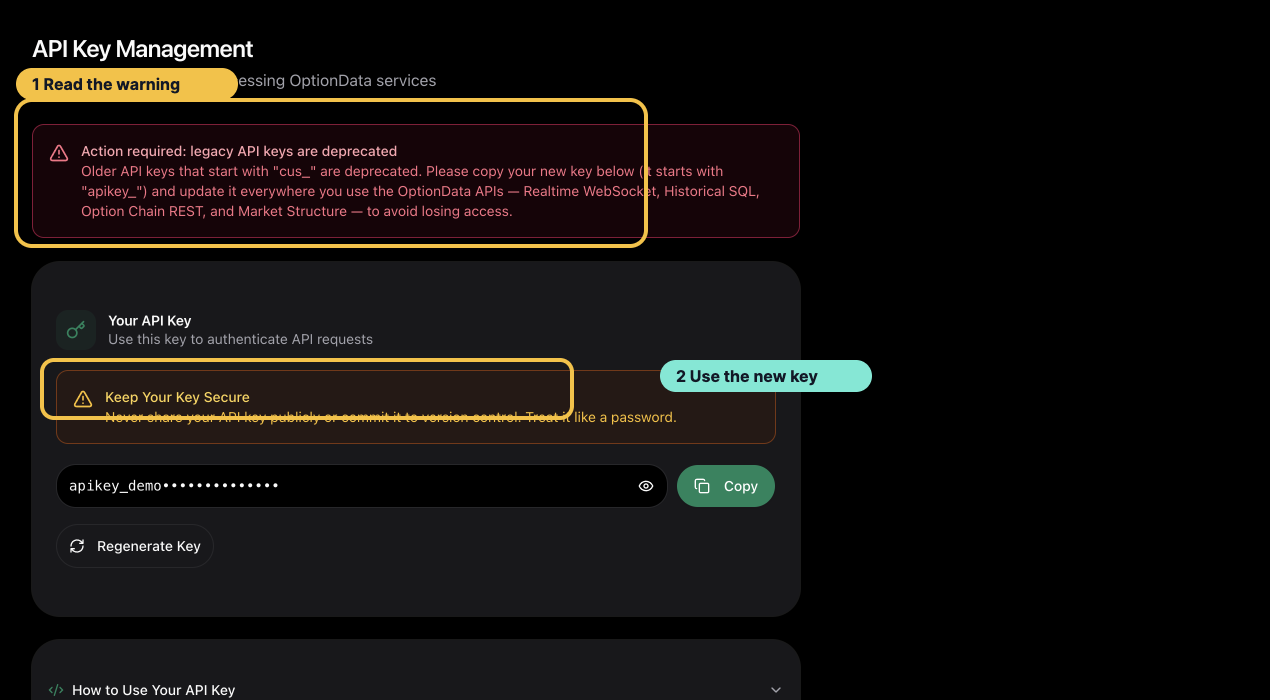
*A visible legacy-key warning is a configuration problem to fix before investigating endpoint behavior.*
## HTTP status guide
| Status | Meaning | Recommended action |
|---|---|---|
| `400` | Request validation or public SQL guard failed | Correct body fields, dates, filters, or SQL |
| `401` | Key missing, malformed, stale, or not owned by the current account | Recopy the key and check the bearer header |
| `403` | Customer recognized but not entitled | Review trial/subscription status |
| `404` | Exact Market Structure root or dated snapshot not found | Check the root and effective date |
| `422` | Historical SQL or Option Chain request exceeded a guardrail | Narrow date, symbol, expiration, or strike scope |
| `429` | Rate or connection limit exceeded | Honor `Retry-After` and back off |
| `504` | Query timed out | Split the request into smaller windows |
| `500` | Unexpected service failure | Retry once, then contact support with the request reference if supplied |
## WebSocket handshake guide
WebSocket authentication is decided during the HTTP upgrade:
- `101 Switching Protocols`: authentication and upgrade succeeded.
- `401`: token missing, invalid, or stale.
- `403`: recognized token without active/trialing entitlement.
- `429`: connection limit reached; keep existing connections open and honor the retry delay.
A listening port or successful DNS lookup does not prove WebSocket authentication. The `101` upgrade is the acceptance signal.
During closed market hours, a successful connection may receive no new live trades. Check the upgrade separately from market activity.
## After regenerating a key
The previous portal key stops working immediately. Update every deployment environment and restart consumers. Verify both:
1. One authenticated HTTP `200` response.
2. One WebSocket `101` upgrade.
## Contact support safely
Send:
- account email
- endpoint and approximate timestamp
- HTTP status and stable error code
- request reference ID, if the server returned one
- final four characters of the key only, if identification is necessary
Never send the complete API key, card number, bank details, ClickHouse password, or raw authorization header.
## All programmatic SEO pages
### Unusual Options Activity API
- URL: https://www.optiondata.io/unusual-options-activity-api/
- Pattern: use-case
- Summary: Build unusual options activity scanners with real-time U.S. options trades, option-chain context, Greeks, implied volatility, and historical SQL.
- Note: For desks and product teams that want their own unusual-activity rules. You write the detection logic. OptionData supplies the tape, chains, and SQL warehouse.
### Options Flow API. Real-Time U.S. Options Tape
- URL: https://www.optiondata.io/options-flow-api/
- Pattern: use-case
- Summary: Options flow API for live U.S. equity option trades over WebSocket. ~10M prints/day, 30+ fields with Greeks & sentiment, server-side filters. 14-day free trial.
- Note: For options flow traders, alert products, and automation that need OPRA-licensed trade prints with server-side filters (symbol, premium, expiry). Delayed end-of-day CSVs are not enough for live scanners.
### Options Data API for Quant Research & Backtesting
- URL: https://www.optiondata.io/options-data-api-for-quant/
- Pattern: use-case
- Summary: Options data API for quants: query 2.8B+ U.S. option trades with ClickHouse SQL, full Greeks & IV, plus live WebSocket for research-to-prod. 14-day free trial.
- Note: For quant researchers, systematic desks, and data scientists who need historical options prints via SQL (not only REST pagination) and a path from notebook backtests to production alerts.
### Options Data API for Fintech Products & Dashboards
- URL: https://www.optiondata.io/options-data-api-for-fintech/
- Pattern: use-case
- Summary: Ship options data into fintech apps with one API key: WebSocket flow, option-chain REST, and historical SQL. ~50ms US latency, 99.9% uptime, 14-day trial.
- Note: For fintech product and platform teams that need a developer-oriented options data API with predictable JSON, multi-language clients, and one key across streaming and REST. It is an API, not a white-label trading UI.
### What Is Options Flow? Definition for Traders & Developers
- URL: https://www.optiondata.io/what-is-options-flow/
- Pattern: glossary
- Summary: Options flow is the real-time stream of option trade prints. Learn how flow differs from volume, why Greeks matter, and how to access OPRA-licensed flow via API.
- Note: On OptionData, options flow arrives as OPRA-licensed WebSocket prints (~10M+/day) with up to 30+ fields including premium, sentiment, and Greeks, not only end-of-day aggregate volume.
### What Is an Option Chain API? Full Chains with Greeks & OI
- URL: https://www.optiondata.io/what-is-option-chain-api/
- Pattern: glossary
- Summary: An option chain API returns strikes, expirations, bid/ask, volume, open interest, IV, and Greeks via REST. See how OptionData delivers full U.S. equity chains.
- Note: OptionData’s option-chain REST API returns a full U.S. equity chain in one POST, including bid/ask, last, open interest, volume, IV, and Greeks for the latest session or a historical trading day.
### What Are Options Greeks? Delta, Gamma, Theta, Vega, Rho + API
- URL: https://www.optiondata.io/what-is-options-greeks/
- Pattern: glossary
- Summary: Options Greeks measure how option prices respond to inputs. Learn Delta, Gamma, Theta, Vega, Rho, IV. and how OptionData exposes Greeks on trades and chains.
- Note: OptionData can attach Delta, Gamma, Theta, Vega, Rho, and implied volatility to qualifying real-time prints (30+ fields) and option-chain snapshots. Scanners can use those fields without a second analytics vendor.
### OptionData vs Alpaca. Real-Time Options Trades
- URL: https://www.optiondata.io/optiondata-vs-alpaca/
- Pattern: comparison
- Summary: OptionData vs Alpaca for real-time options: options-first underlying subscribe, server-side filters, and AGGREGATED prints vs a broker-attached OPRA stream. Who each is for.
- Note: Choose OptionData when the job is flow analytics and fast time-to-alert (~10M trades/day, 30+ enriched fields). Choose Alpaca when you already execute there and want one vendor for orders plus raw market data.
### OptionData vs Intrinio. Real-Time Options Data
- URL: https://www.optiondata.io/optiondata-vs-intrinio/
- Pattern: comparison
- Summary: OptionData vs Intrinio for real-time options: flow specialist with AGGREGATED mode and server-side filters vs a broad multi-dataset financial data platform. Who each is for.
- Note: Pick OptionData when unusual flow, sweeps/blocks, and SQL history on the options tape are the product. Pick Intrinio when you need many non-options datasets under one vendor contract.
### OptionData vs Massive.com (ex-Polygon). Options Flow
- URL: https://www.optiondata.io/optiondata-vs-massive/
- Pattern: comparison
- Summary: OptionData vs Massive.com for real-time options: options-native underlying subscribe and AGGREGATED flow vs multi-asset market data. Who each is for.
- Note: Choose OptionData when options flow depth and time-to-alert dominate. Choose Massive when stocks, options, forex, and crypto must come from one multi-asset feed and invoice.
### Options Flow API for Fintech Apps
- URL: https://www.optiondata.io/options-flow-api-for-fintech/
- Pattern: use-case
- Summary: Embed real-time options flow in fintech products: WebSocket tape, server-side filters, 30+ fields, one API key with chains and SQL. Built for app backends.
- Note: Fintech product teams layering options flow into dashboards . You control UX and entitlements. OptionData supplies the licensed tape (~10M trades/day) and ~50ms US HTTP surfaces for companion APIs.
### Options Flow API for Quant Research
- URL: https://www.optiondata.io/options-flow-api-for-quant/
- Pattern: use-case
- Summary: Use real-time options flow and ClickHouse SQL together: live features on the tape, historical validation on 2.8B+ trades, Greeks and IV on prints.
- Note: For quant researchers who need both a live options tape (~10M/day) and a SQL warehouse (2.8B+ trades from Feb 2025+) with consistent Greeks/IV/premium semantics.
### Unusual Options Activity for Quant Research
- URL: https://www.optiondata.io/unusual-options-activity-for-quant/
- Pattern: use-case
- Summary: Research and backtest unusual options activity rules with historical SQL, then run the same logic on the live tape. Greeks, IV, premium, and DTE filters included.
- Note: For quant and systematic desks that treat UOA as a feature research problem. You own labels and thresholds. OptionData provides OPRA prints, chains, and 2.8B+ historical rows.
### What Is Implied Volatility (IV)? Options IV Explained
- URL: https://www.optiondata.io/what-is-implied-volatility/
- Pattern: glossary
- Summary: Implied volatility is the market’s priced uncertainty for an option. Learn how IV differs from historical vol and how OptionData exposes IV on trades and chains.
- Note: OptionData can attach implied volatility to qualifying real-time prints and option-chain snapshots, and you can aggregate IV in historical SQL across 2.8B+ stored trades.
### What Is Open Interest (OI) in Options?
- URL: https://www.optiondata.io/what-is-open-interest/
- Pattern: glossary
- Summary: Open interest is the number of open option contracts. Learn OI vs volume, why flow tools use size-vs-OI, and how OptionData exposes OI on option chains.
- Note: OptionData option-chain REST responses include open interest with bid/ask, volume, IV, and Greeks so unusual-activity rules can compare print size to standing OI, not only raw premium.
### What Is OPRA Options Data? Licensed U.S. Options Feeds
- URL: https://www.optiondata.io/what-is-opra-options-data/
- Pattern: glossary
- Summary: OPRA is the consolidated U.S. options last-sale and quote infrastructure. Learn what OPRA-licensed data means and how OptionData delivers OPRA options trades via API.
- Note: OptionData provides an OPRA-licensed U.S. equity options feed for real-time trades (~10M+/day), with historical SQL and option chains under the same commercial plan. Teams do not need to scrape unlicensed sources.
### U.S. Options Historical Data API (Chinese demand hub)
- URL: https://www.optiondata.io/meigu-qiquan-lishi-shuju-api/
- Pattern: use-case
- Summary: U.S. options historical data API via ClickHouse SQL: 2.8B+ OPRA-derived trades, Greeks, IV, and premium. Built for backtests and the 美股期权历史数据 query cluster.
- Note: GSC shows 美股期权历史数据 as a high-CTR Chinese query for OptionData. This page and /historical_data/?lang=zh are the primary landing surfaces for that intent.
### Options Flow API (Chinese: 期权流 API)
- URL: https://www.optiondata.io/qiquan-liu-api/
- Pattern: use-case
- Summary: Options flow API for U.S. equities: OPRA WebSocket tape, server-side filters, AGGREGATED/RAW modes, 30+ fields with Greeks. Chinese hub for 期权流 API.
- Note: Same WebSocket as /realtime_data and /options-flow-api — optimized copy for Chinese-language search and HK/TW Google.
### U.S. Options API Hub (美股期权 API)
- URL: https://www.optiondata.io/meigu-qiquan-api/
- Pattern: use-case
- Summary: U.S. options API hub: OPRA WebSocket flow, historical SQL, option chains, and GEX market structure under one key. Chinese hub for 美股期权 API / 美股期权数据.
- Note: Chinese-language Google demand often starts with 美股期权 API or 美股期权数据 — this hub routes that intent to the right product.
### Option Chain API (Chinese: 期权链 API)
- URL: https://www.optiondata.io/qiquan-lian-api/
- Pattern: use-case
- Summary: Option chain API for full U.S. chains with strikes, expirations, bid/ask, OI, IV, and Greeks. Chinese hub for 期权链 API.
- Note: Same endpoint as /option_chain — ZH-first copy for Google Chinese queries.
### Options GEX API (Chinese: 期权 GEX API)
- URL: https://www.optiondata.io/qiquan-gex-api/
- Pattern: use-case
- Summary: Options GEX / market structure API: full-chain Gamma Exposure, Gamma Flip, walls, Max Pain, IV context. Chinese hub for 期权 GEX API.
- Note: Same API as /market_structure — model-based put signing, not disclosed dealer inventory.
## Contact
- Email: support@optiondata.io
- Discord: https://discord.com/invite/mE5pEDMdWs
- X: https://x.com/optiondataio