
Docs/Manage Your Subscription and Billing
Manage Your Subscription and Billing
Review your OptionData plan, open the Stripe customer portal, update billing details, view invoices, and understand cancellation timing.
Open product page →View as Markdown
Ask ChatGPT or Claude Code
Copy this prompt, paste it into ChatGPT, Claude, Claude Code, Cursor, or Codex, then add your question. It tells the model to read our public docs first — no API key needed for that step.
You are helping me use OptionData (https://www.optiondata.io/), an OPRA-licensed U.S. equity options data API.

Before answering, fetch these public files (no login required) and treat them as the source of truth:
- https://www.optiondata.io/llms.txt — short product map (same content as https://www.optiondata.io/llm.txt)
- https://www.optiondata.io/llms-full.txt — full API reference
- https://www.optiondata.io/openapi.json — HTTP OpenAPI

Do not invent endpoints, fields, tables, or limits. Prefer `Authorization: Bearer apikey_…` for HTTP APIs. Realtime uses `wss://ws.optiondata.io` with a `token` query parameter.

Products:
- Realtime trades WebSocket: wss://ws.optiondata.io
- Historical SQL: POST https://www.optiondata.io/api/historical/sql
- Option chain: POST https://www.optiondata.io/api/option-chain
- Market structure: GET https://www.optiondata.io/api/v1/market-structure/{symbol}

I am asking about: Manage Your Subscription and Billing
- Markdown: https://www.optiondata.io/md/manage-subscription/
- HTML docs: https://www.optiondata.io/docs/manage-subscription/

My question:
OptionData uses the Stripe customer portal for subscription and billing management.
Open billing management
- Sign in and open Billing.
- Review the plan name, standard amount, billing interval, and current status.
- Select Manage Subscription.
- OptionData opens a secure session at
https://billing.stripe.com/.
Never enter payment information on a different domain.
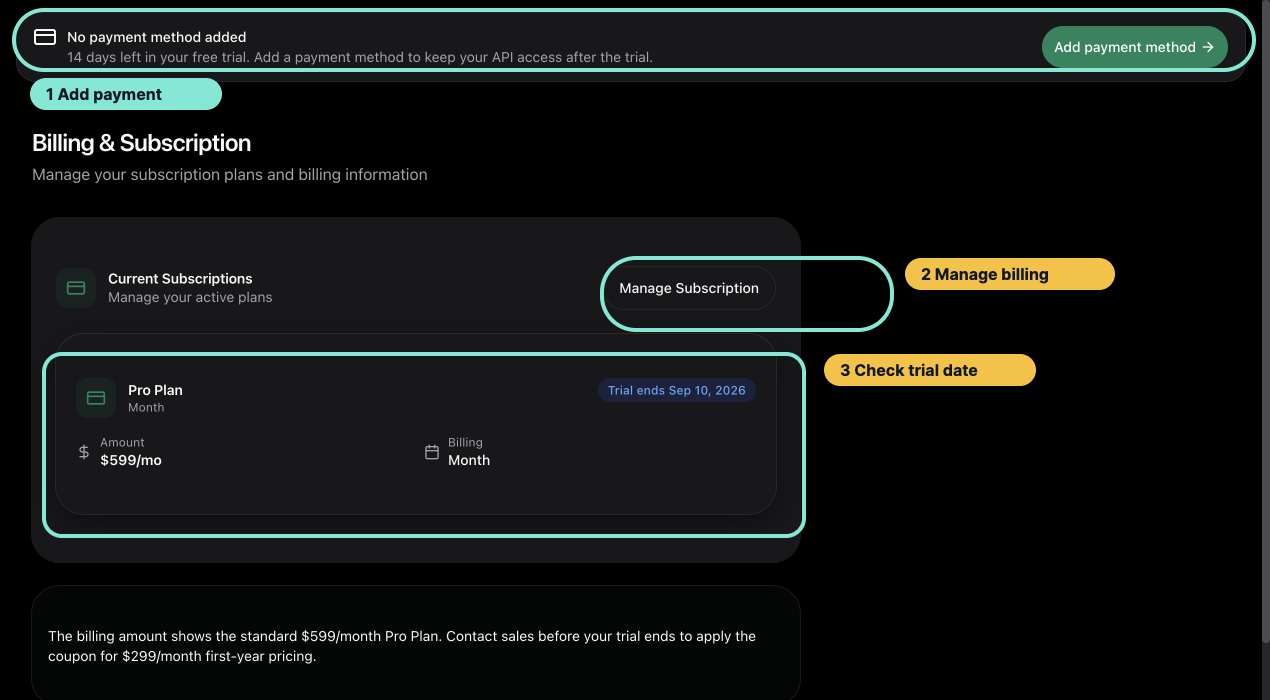
Use the Billing page to confirm the subscription state and trial date before opening Stripe.
Add or update a payment method
Trial users without a usable payment method see an Add payment method reminder in the dashboard. Follow the annotated guide: Add a Payment Method During Your Free Trial.
To update a saved method later, open Manage Subscription and choose the payment-method action in Stripe.
View invoices and billing history
Use the Stripe portal to review the invoice history available for your account. Download invoice or receipt records from Stripe rather than copying sensitive payment details into OptionData support messages.
Cancel a subscription
Choose the cancellation action in Stripe and review the effective date before confirming. The portal confirmation is the authoritative description of whether access ends immediately or at the end of the billing period.
After returning to OptionData, refresh Billing if the new status is not visible yet.
Promotional pricing
The Billing page shows the standard Pro Plan amount. If OptionData provided a first-year promotion, confirm that it has been applied before the trial ends. Contact Support if the expected promotion is missing.
Billing support safety
When contacting support, include your account email and a description of the issue. Never send a complete card number, bank account, CVC, or full API key.