
Docs/Troubleshoot Authentication and Access
Concepts & troubleshootingTroubleshoot Authentication and Access
Diagnose OptionData API key, subscription, rate-limit, query-width, timeout, and WebSocket handshake failures without exposing credentials.
On this page
Use the HTTP status, stable error code, and request type to separate authentication problems from entitlement, rate-limit, and query-shape problems.
Start with this checklist
- Confirm you can sign in to the intended OptionData account.
- Confirm the qualification survey is complete.
- Open Billing and verify the Pro subscription is
trialingoractive. - Copy the current key from API Key.
- Ensure the application is using that current key—not a value cached before regeneration.
- Test one small HTTP request before testing a long-running client.
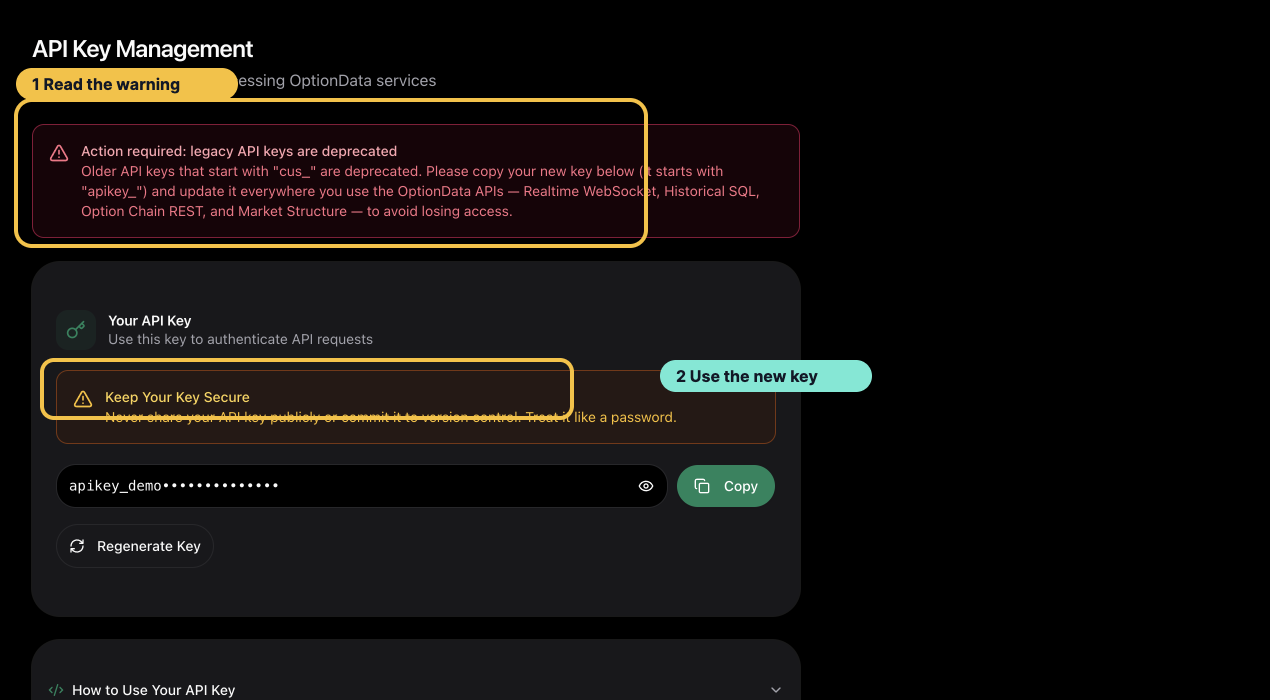 Select the image to view it at full size.
A visible legacy-key warning is a configuration problem to fix before investigating endpoint behavior.
HTTP status guide
| Status | Meaning | Recommended action |
|---|---|---|
400 | Request validation or public SQL guard failed | Correct body fields, dates, filters, or SQL |
401 | Key missing, malformed, stale, or not owned by the current account | Recopy the key and check the bearer header |
403 | Customer recognized but not entitled | Restore Pro access at the response's billing_url (/billing) |
404 | Exact Market Structure root or dated snapshot not found | Check the root and effective date |
422 | Historical SQL or Option Chain request exceeded a guardrail | Narrow date, symbol, expiration, or strike scope |
429 | Rate or connection limit exceeded | Honor Retry-After and back off |
504 | Query timed out | Split the request into smaller windows |
500 | Unexpected service failure | Retry once, then contact support with the request reference if supplied |
WebSocket handshake guide
WebSocket authentication is decided during the HTTP upgrade:
101 Switching Protocols: authentication and upgrade succeeded.401: token missing, invalid, or stale.403: recognized token without active/trialing entitlement. A failed renewal payment keeps access for 7 days from the start of the unpaid billing period; after that, requests return403until the invoice is paid.429: connection limit reached; keep existing connections open and honor the retry delay.
A listening port or successful DNS lookup does not prove WebSocket authentication. The 101 upgrade is the acceptance signal.
During closed market hours, a successful connection may receive no new live trades. Check the upgrade separately from market activity.
After regenerating a key
The previous portal key stops working immediately. Update every deployment environment and restart consumers. Verify both:
- One authenticated HTTP
200response. - One WebSocket
101upgrade.
Contact support safely
Send:
- account email
- endpoint and approximate timestamp
- HTTP status and stable error code
- request reference ID, if the server returned one
- final four characters of the key only, if identification is necessary
Never send the complete API key, card number, bank details, ClickHouse password, or raw authorization header.
Ask ChatGPT or Claude Code
Copy this prompt, paste it into ChatGPT, Claude, Claude Code, Cursor, or Codex, then add your question. It tells the model to read our public docs first — no API key needed for that step.
You are helping me use OptionData (https://www.optiondata.io/), an OPRA-licensed U.S. equity options data API.

Before answering, fetch these public files (no login required) and treat them as the source of truth:
- https://www.optiondata.io/llms.txt — short product map (same content as https://www.optiondata.io/llm.txt)
- https://www.optiondata.io/llms-full.txt — full API reference
- https://www.optiondata.io/openapi.json — HTTP OpenAPI

Do not invent endpoints, fields, tables, or limits. Prefer `Authorization: Bearer apikey_…` for HTTP APIs. Realtime uses `wss://ws.optiondata.io` with a `token` query parameter.

Products:
- Realtime trades WebSocket: wss://ws.optiondata.io
- Historical SQL: POST https://www.optiondata.io/api/historical/sql
- Option chain: POST https://www.optiondata.io/api/option-chain
- Market structure: GET https://www.optiondata.io/api/v1/market-structure/{symbol}

I am asking about: Troubleshoot Authentication and Access
- Markdown: https://www.optiondata.io/md/troubleshoot-api-access
- HTML docs: https://www.optiondata.io/docs/troubleshoot-api-access

My question: