
Docs/Getting Started with OptionData
Getting startedGetting Started with OptionData
Create an account, complete qualification, explicitly activate the 14-day Pro trial, get an API key, and choose your first OptionData API workflow.
On this page
This guide takes you from a new account to your first authenticated OptionData request.
1. Register your account
Open OptionData and choose Sign up. Enter your email address and use the one-time verification code to create your account. If you already have an account, sign in instead.
2. Request your invitation code
After registration, use the OptionData Support page's QR contact module to reach our team and request the invitation code required to complete qualification. The same support module is shown on the qualification screen; use its displayed channels for this request.
3. Complete the qualification survey
The data products are gated by a short qualification survey. Enter the invitation code supplied to you and complete the licensing attestations.
Qualification does not start the trial clock. After approval, the portal keeps your trial ready until you explicitly activate it.
4. Activate your free trial
Select Activate 14-day free trial when you are ready. The countdown begins immediately after Stripe confirms activation; no payment method is required.
5. Copy your API key
Open API Key, then select Copy. Store the key in a password manager or environment variable—never commit it to source control.
For detailed key handling and rotation, see Manage Your API Key.
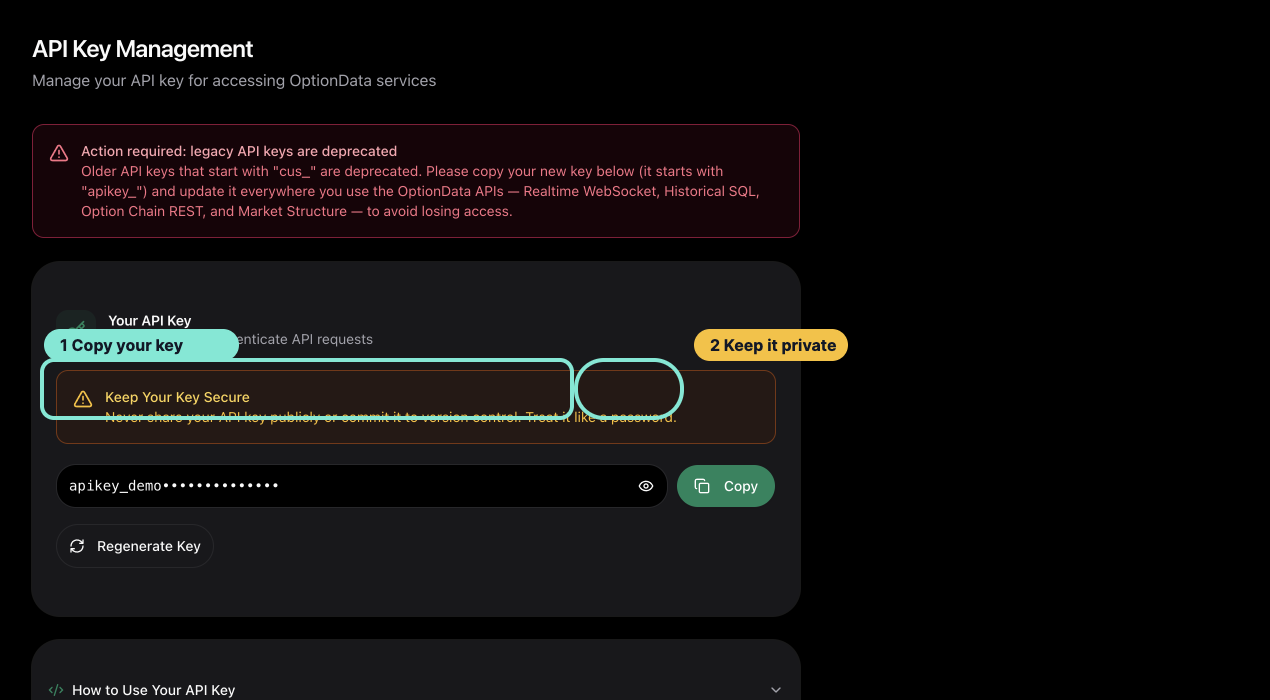 Select the image to view it at full size.
The API Key page is the handoff point between account setup and your first API request.
6. Choose your first workflow
| Goal | Start here |
|---|---|
| Validate a WebSocket client | Realtime WebSocket Quickstart |
| Query historical option trades | Historical SQL Quickstart |
| Retrieve a current option chain | Option Chain Quickstart |
| Read GEX, walls, and volatility context | Market Structure Quickstart |
The same API key authenticates all four workflows. Access requires an active or trialing Pro subscription. If a renewal payment fails, access continues for 7 days from the start of the unpaid billing period while you update your payment method on Billing.
7. Continue after the trial
During a no-card trial, the dashboard shows how many days remain. To continue access after the trial, follow Add a Payment Method During Your Free Trial.
Eligible trial users can receive 50% off for life with a promotion code from Sales. Contact Sales for the code, then enter it on Billing before the trial ends.
Review your plan, trial end date, and billing state at Billing.
What trial access includes
- Realtime WebSocket access during the trial.
- Historical SQL over the past 7 days, up to 1,000 rows per response.
- Option Chain and Market Structure access.
- The same authentication and response contracts used by active subscriptions.
If a request fails, use Troubleshoot Authentication and Access before rotating your key.
Ask ChatGPT or Claude Code
Copy this prompt, paste it into ChatGPT, Claude, Claude Code, Cursor, or Codex, then add your question. It tells the model to read our public docs first — no API key needed for that step.
You are helping me use OptionData (https://www.optiondata.io/), an OPRA-licensed U.S. equity options data API.

Before answering, fetch these public files (no login required) and treat them as the source of truth:
- https://www.optiondata.io/llms.txt — short product map (same content as https://www.optiondata.io/llm.txt)
- https://www.optiondata.io/llms-full.txt — full API reference
- https://www.optiondata.io/openapi.json — HTTP OpenAPI

Do not invent endpoints, fields, tables, or limits. Prefer `Authorization: Bearer apikey_…` for HTTP APIs. Realtime uses `wss://ws.optiondata.io` with a `token` query parameter.

Products:
- Realtime trades WebSocket: wss://ws.optiondata.io
- Historical SQL: POST https://www.optiondata.io/api/historical/sql
- Option chain: POST https://www.optiondata.io/api/option-chain
- Market structure: GET https://www.optiondata.io/api/v1/market-structure/{symbol}

I am asking about: Getting Started with OptionData
- Markdown: https://www.optiondata.io/md/getting-started
- HTML docs: https://www.optiondata.io/docs/getting-started

My question: